
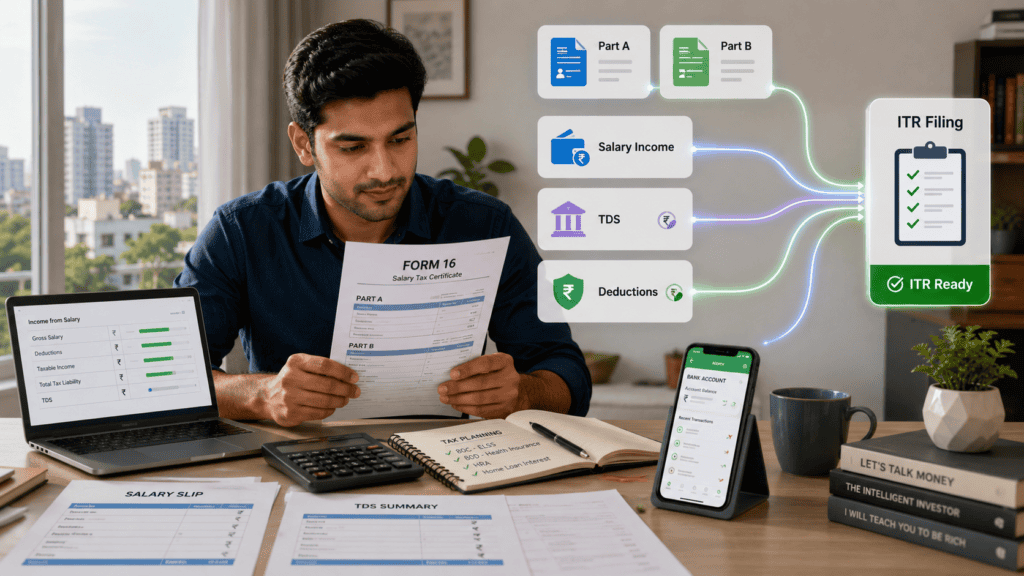

Your complete guide to understanding Form 16 Part A, Part B, salary TDS, deductions and what to verify before filing your ITR for the relevant assessment year.
Every June, millions of salaried employees across India receive Form 16 from their employer. Most people glance at it, save it somewhere, and either hand it to a CA or upload it to a tax portal without reading a single line. That is a mistake — and it can cost you a refund you never knew you had, or land you with a demand notice you did not expect.
Form 16 meaning is not complicated. But knowing what each section actually says, how it connects to your real salary, and what you must cross-check before filing ITR for the relevant assessment year is the difference between a clean filing and a stressful one. This article walks you through every part of Form 16 — line by line — so you can read it yourself before you file.
Quick Answer: Form 16 Meaning
Form 16 meaning is simple: it is the salary TDS certificate your employer gives you, usually in two parts, showing salary paid, deductions, taxable income and TDS deposited. Before filing ITR, match Form 16 with salary slips, Form 26AS, AIS and Income Tax portal data.
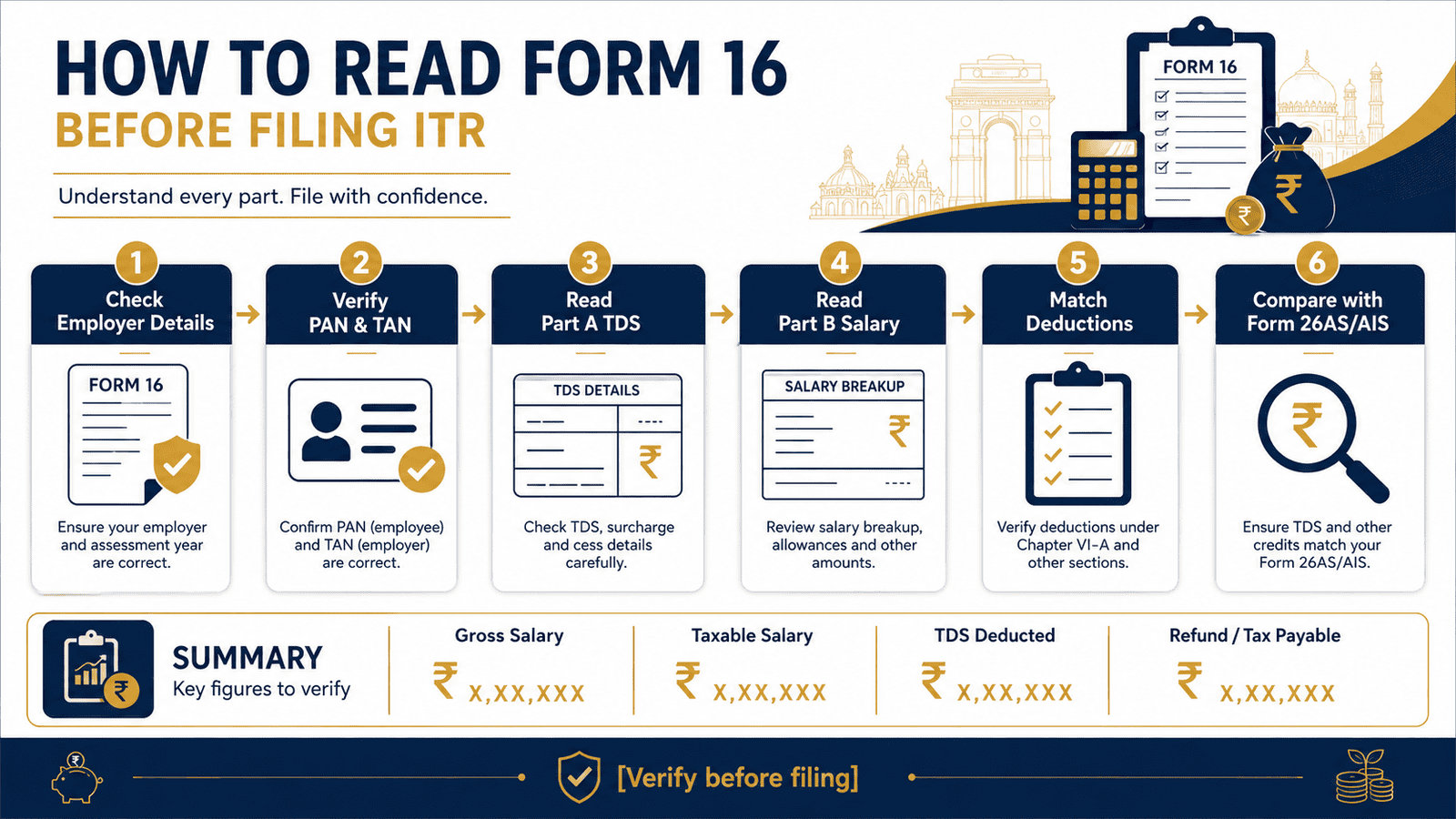
Key Takeaways
- Form 16 is a TDS certificate issued by your employer under Section 203 of the Income Tax Act — it comes in two parts: Part A (employer and TDS details) and Part B (salary computation and deductions).
- Part A is generated directly through the government’s TRACES portal and shows quarter-wise TDS deposits. Part B is prepared by your employer and shows gross salary, exemptions, standard deduction, Chapter VI-A deductions and taxable income.
- TDS shown in Form 16 is tax already deducted by your employer — it may not equal your final tax liability once all income sources are added in ITR.
- Before filing ITR, match the TDS figure in Form 16 Part A with what appears in Form 26AS on the Income Tax portal — any mismatch must be resolved with your employer first.
- AIS (Annual Information Statement) captures income your employer does not know about — FD interest, dividends, capital gains and property transactions — which must also be declared in ITR.
- If you switched jobs during the financial year, you need a separate Form 16 from each employer. Using only one will underreport salary income.
- The tax regime shown in Form 16 Part B — old or new — is the one your employer used for TDS. You can switch regimes when filing ITR, but you must recalculate taxable income accordingly.
Key Facts at a Glance
| Parameter | Detail |
|---|---|
| Full name | Form 16 — TDS Certificate for Salary Income |
| Issued by | Your employer (company or individual who deducted TDS) |
| Issued to | Salaried employees from whom TDS was deducted |
| Two parts | Part A: employer TAN, PAN, TDS deposited quarter-wise; Part B: salary, exemptions, deductions, taxable income |
| Assessment year | Covers the financial year of earning — confirm the AY printed on your Form 16 before filing |
| Form 16 issue deadline | June 15 after the end of the relevant financial year (verify current deadline at incometax.gov.in) |
| Where to cross-check | incometax.gov.in — Form 26AS, AIS, pre-filled ITR data |
| Legal basis | Section 203 of the Income Tax Act, 1961 |
What Is Form 16 and Why Salaried Employees Receive It
Form 16 is the TDS certificate your employer issues under Section 203 of the Income Tax Act, 1961. When an employer deducts TDS from your salary, they are legally required to give you this certificate as proof of what was deducted and deposited with the government. It summarises what you earned during the financial year, what deductions were applied and how much tax was already paid on your behalf.
Think of it as a salary-tax summary — not just a tax document. Your ITR filing for the relevant assessment year starts here.
Form 16 Part A — Employer and TDS Details
Part A is generated and digitally authenticated through the government’s TRACES portal (TDS Reconciliation Analysis and Correction Enabling System). This is what makes Part A a verified, government-sourced record — not just something your employer typed up. The key fields you will find in Part A:
- Employer name, address and TAN — the Tax Deduction Account Number used to trace TDS deposits
- Employee name, PAN and address — confirm your PAN is exactly correct here
- Assessment year — the year for which this certificate is issued
- Period of employment — from date and to date, important if you joined or left mid-year
- Quarter-wise TDS deposited — with acknowledgement numbers for each quarter
The single most important check in Part A: verify that your PAN is printed correctly. One wrong digit means TDS credit will not appear under your account on the Income Tax portal — and you could lose a refund or face a demand for tax your employer already deposited.
Form 16 Part B — Salary Breakdown and Tax Computation
Part B is prepared by your employer, not directly pulled from a government database. It is a detailed computation of how your total salary translates into taxable income. This is the section that most first-time readers find confusing — because the numbers look very different from what was credited to your bank account every month. Key fields in Part B:
- Gross salary — total salary credited during the financial year
- Allowances exempt under Section 10 — HRA, LTA and other components that reduce taxable income, if claimed
- Standard deduction — a flat deduction available to all salaried employees under the relevant tax regime
- Deductions under Chapter VI-A — Section 80C (EPF, PPF, ELSS, LIC, home loan principal), Section 80D (health insurance), Section 80CCD and others if applicable under the old regime
- Taxable salary — what remains after all exemptions and deductions
- Tax computed — tax payable on taxable salary using the slabs for the relevant assessment year
- Rebate under Section 87A — if applicable based on net taxable income and the regime selected
- Total TDS deducted for the year
Understanding how your gross salary converts to taxable salary is the most important skill you can build from reading Form 16. For a detailed breakdown of this conversion, see taxable income from salary — how to calculate it.
Which Tax Regime Is Reflected in Form 16
From FY 2023-24 onwards, an employee can declare their preferred tax regime — old or new — to their employer at the start of the financial year. The employer then applies that regime for TDS and reflects it in Part B of Form 16. This means your Form 16 shows computation under one specific regime. You can still switch to the other regime when filing ITR — but you must check which regime your employer used and recalculate accordingly before filing.
TDS Deducted Is Not Always Your Final Tax
A critical point that many salaried employees miss: TDS shown in Form 16 is only what your employer deducted based on the income and declarations they knew about. Your final ITR may show additional tax payable — or a refund — because you had income from bank interest, fixed deposits, capital gains or rental income that your employer did not account for, or because your actual investments differed from what you declared to HR. For a full explanation of how employer TDS connects to your final tax outcome, see salary TDS: meaning, calculation and refund.
Real Example: Ankit Reads His Form 16 Before Filing
Ankit, 29, software engineer, Bengaluru. Gross salary for FY 2024-25: ₹12,00,000. His employer processed payroll under the new tax regime.
Form 16 Part B shows: gross salary ₹12,00,000, less standard deduction ₹75,000, balance salary ₹11,25,000. No Chapter VI-A deductions were applied since Ankit chose the new regime. Taxable salary: ₹11,25,000. Tax computed by employer: ₹71,500 including cess. TDS deducted and deposited: ₹71,500.
When Ankit logs into the Income Tax portal, his pre-filled ITR shows ₹15,000 of FD interest income. That was not in Form 16 — his bank reported it to the tax department separately via AIS. His actual taxable income becomes ₹11,40,000, and his final tax liability works out to ₹73,800. He owes ₹2,300 more than what was deducted.
Without reading Form 16 carefully and cross-checking with portal data, Ankit would have filed with an underpayment and received a demand notice later. Use the income tax calculator for FY 2025-26 to estimate your own liability after reviewing your Form 16 figures.
How to Calculate Taxable Income from Your Form 16
Reading Form 16 Part B follows a simple subtraction flow. Every line reduces gross salary until you arrive at taxable income:
Taxable Salary = Gross Salary − Section 10 Exemptions − Standard Deduction − Chapter VI-A Deductions
Step-by-step using Ankit’s numbers (new regime, FY 2024-25):
- Gross salary from Part B: ₹12,00,000
- Less HRA or other Section 10 exemptions: ₹0 (not claimed)
- Less standard deduction: ₹75,000
- Less Chapter VI-A deductions: ₹0 (new regime does not allow most deductions)
- Taxable salary: ₹11,25,000
Then, add any income not in Form 16 — FD interest, dividends, rent — before computing final tax in ITR. The tax regime selected also determines which deductions apply and which slabs are used.
| Scenario | Key Inputs | Taxable Income |
|---|---|---|
| New regime, no Chapter VI-A deductions | Gross ₹12L, standard deduction ₹75,000 | ₹11,25,000 |
| Old regime, 80C claimed in full | Gross ₹12L, standard deduction ₹50,000, 80C ₹1,50,000 | ₹10,00,000 |
| Old regime, 80C + 80D claimed | Gross ₹12L, standard deduction ₹50,000, 80C ₹1,50,000, 80D ₹25,000 | ₹9,75,000 |
Comparison: Form 16 vs Form 26AS vs AIS
| Document | What It Contains | Why Check It Before ITR |
|---|---|---|
| Form 16 (Part A + B) | Salary earned, TDS deducted by employer, standard deduction, Chapter VI-A deductions, taxable income and tax computation | Starting point for ITR — but covers only your employer salary income |
| Form 26AS | All TDS deposits across sources, advance tax paid, self-assessment tax, refunds issued | Confirm that employer actually deposited the TDS amount shown in Form 16 Part A under your PAN |
| AIS — Annual Information Statement | Bank interest, FD income, dividends, capital gains, mutual fund transactions, property dealings, foreign remittances | Catches income not in Form 16 that must be declared in ITR — missing these can trigger a demand notice |
How to Decide What’s Right for You
you had only one employer the entire financial year and no other income — then Form 16 from that employer covers most of your salary ITR inputs. Cross-check with Form 26AS and the pre-filled ITR before filing to catch any TDS discrepancies.
you switched jobs during the financial year — then you need Form 16 from both your previous and current employer. Add salary and TDS figures from both before filing ITR. Using only one will underreport income and undercount TDS credit.
your employer processed TDS under the old tax regime and you want to file under the new regime — then recalculate taxable income using new regime slabs and deduction rules. The computation in Form 16 Part B will look different. See the old vs new tax regime comparison for salaried employees before deciding.
the TDS amount in Form 16 does not match Form 26AS — then do not file ITR yet. Contact your employer’s payroll or HR team and ask them to correct the TDS return. Filing with a mismatch can delay refunds or trigger a tax demand for credit the government has not recorded.
Form 16 shows deductions like 80C or 80D that you declared to HR at the start of the year but never actually invested — then your taxable income on Form 16 is understated. Your final ITR will show additional tax payable, plus interest under Section 234B. Recalculate before filing.
you have only salary income and absolutely no other income — bank interest, rental income, capital gains, freelance payments — then relying primarily on Form 16 for a basic ITR-1 filing is reasonable. The moment any other income source exists, Form 16 alone is not sufficient.
Common Mistakes to Avoid
Filing ITR Directly from Form 16 Without Checking Form 26AS or AIS
Many salaried employees treat Form 16 as the only document needed for ITR.
Form 26AS shows TDS deposits as recorded by the government — it can differ from your Form 16 if your employer made an error in filing their TDS return. AIS captures income like FD interest, dividends and capital gains that never appear in Form 16 at all. Ignoring either can mean missing taxable income or claiming a TDS credit that was never deposited — both can lead to a demand notice. See AIS vs Form 26AS — why both matter for your ITR.
Log into incometax.gov.in and verify both Form 26AS and AIS before submitting ITR.
Not Collecting Form 16 from a Previous Employer After Switching Jobs
If you changed employers during the financial year, your current employer only knows about the salary they paid you.
Your previous employer’s TDS may already be deposited with the government — but it is not reflected in your current Form 16. Filing without that Form 16 means underreporting salary income for the year, which is a mismatch the Income Tax Department will notice when they compare your ITR with employer TDS returns.
Email your previous employer’s HR team before the Form 16 deadline. It is your legal right to receive it.
Assuming TDS Equals Final Tax
Your employer deducts TDS based only on the salary income and declarations you submitted at the start of the year.
If you earned ₹30,000 from a fixed deposit or received ₹60,000 rental income during the year, none of that appears in Form 16. Your actual tax liability will be higher than the TDS already deducted. Filing without accounting for this income means underpaying tax — and a demand notice with interest later.
Always add all income sources when completing ITR — not just salary from Form 16.
Claiming Deductions You Cannot Prove With Documentation
Form 16 Part B may show deductions based on investment declarations you submitted to HR at the start of the year — 80C, 80D, HRA, LTA.
If you never actually made those investments or did not collect the required proofs, the deduction reduces taxable income incorrectly. At ITR filing time, you will owe additional tax plus interest under Section 234A or 234B. Keep actual investment certificates, insurance premium receipts and rent receipts — and match them to what Form 16 reflects.
If they do not match, recalculate your taxable income before filing.
Ignoring the Tax Regime Shown in Form 16 Part B
Form 16 Part B reflects the regime — old or new — that your employer applied for TDS computation. Many employees do not notice this.
If your employer used the old regime and you want to file under the new regime (or vice versa), the deductions, slab rates and taxable income will all differ. Simply accepting the Form 16 computation without checking the regime can mean paying more tax than necessary — or underpaying.
Identify the regime your employer used. If you want to change it at filing, recalculate the full computation before submitting.
Not Verifying Your PAN in Form 16 Part A
A single incorrect digit in your PAN on Form 16 Part A means TDS credit will not link to your income tax account.
Even if your employer deposited every rupee of TDS correctly, it will appear under a wrong PAN — and your Form 26AS will not reflect it. You could lose a refund or face a demand for tax that was actually paid. Check your PAN on Part A before reading anything else.
If there is an error, ask your employer to correct it in their TDS return immediately.
When This May Not Be the Right Choice
Relying primarily on Form 16 for your ITR filing does not work cleanly in every situation.
If you had two or more employers during the financial year, a single Form 16 will capture only part of your salary income. If you earned freelance or business income alongside your salary, Form 16 has no field for it — and a different ITR form may apply entirely. If you have capital gains from mutual fund redemptions, stock sales or property transactions, these fall completely outside Form 16 and must be reported separately using transaction data from your broker or registrar. If you have house property income — rental or deemed — or any foreign income, Form 16 cannot account for these.
If any of these apply to your situation, it may be worth exploring alternatives before committing.
Official Rules and Where to Verify
All Form 16 formats, TDS rules, deduction limits and ITR filing procedures are governed by the Income Tax Department. Verify current rules and access your documents at:
- Income Tax Department — incometax.gov.in (access Form 26AS, AIS, pre-filled ITR, e-filing portal)
- TRACES portal — tdscpc.gov.in (verify TDS certificate authenticity and download Form 16 if your employer uses this portal)
- Your employer’s payroll or HR portal — for downloading Form 16 and checking annual salary statements
Rules, limits, and rates on this topic can change with each Budget or regulatory update. Always verify current figures directly from the official source before making any financial decision.
Once you have verified Form 16, use the ITR filing checklist for salaried employees to complete your preparation before submitting.
Expert Tips
- Download Form 16 as a PDF immediately once it is available — usually after June 15. Save it in a folder labelled by financial year. You will need it for every query, recheck and future filing related to that year.
- Check PAN and TAN in Part A before reading anything else. Your PAN must be exactly correct, and the employer’s TAN must match their registered details. A wrong PAN means TDS credit will not appear under your account.
- Compare gross salary in Form 16 Part B with your full-year salary slip total or March payslip summary. If the numbers do not match what was actually credited to your account, ask payroll to explain the difference before filing.
- Log into incometax.gov.in and open Form 26AS before touching ITR. Confirm that the TDS shown in Form 16 Part A appears as a deposited credit under your PAN — quarter by quarter, not just as a total.
- Open AIS on the Income Tax portal and look for income your employer does not know about — savings bank interest above ₹10,000 per year, FD interest, dividend payments, mutual fund redemptions. These all appear in AIS and must be declared in ITR even if they are not in Form 16.
- If you submitted investment declarations to HR but did not complete those investments by year-end, recalculate your taxable income using what you actually invested. The difference will result in additional tax payable at filing, plus interest if not self-assessed on time.
- Keep the original TRACES-authenticated Form 16 PDF — do not rely on screenshots or forwarded email attachments. The digitally signed PDF is the authentic document that can be verified on the TRACES portal.
Frequently Asked Questions
Is Form 16 mandatory to file ITR as a salaried employee?
Form 16 is not legally mandatory to file ITR — but it is strongly recommended. It contains your TDS certificate, complete salary summary and tax computation, all of which are needed to fill ITR accurately. Without it, you would need to reconstruct all figures manually from salary slips, Form 26AS and AIS. That is possible but significantly more effort and more prone to errors.
What if my employer does not give me Form 16?
If TDS was deducted from your salary, your employer is legally required to issue Form 16 by June 15 of the following financial year. If they have not, request it formally in writing through HR or payroll. In the meantime, use Form 26AS and AIS to verify TDS deposits and reconstruct income figures. If the employer refuses, you can raise a complaint through the Income Tax Department at incometax.gov.in or write to your jurisdictional Assessing Officer.
What is the difference between Form 16 Part A and Part B?
Part A is generated by the government’s TRACES portal and shows TDS deposited quarter-by-quarter along with your PAN, the employer’s TAN and the assessment year. It is a government-authenticated record. Part B is prepared by your employer and shows detailed salary computation — gross salary, exemptions, standard deduction, Chapter VI-A deductions and taxable income. You need both parts to file a complete and accurate ITR.
Can I file ITR without Form 16?
Yes. If your employer did not deduct TDS or has not issued Form 16 in time, you can still file ITR using salary slips to establish income and Form 26AS or AIS to verify any TDS deposits made. The figures you report in ITR must still be accurate and match the income and tax records the government holds — so careful cross-checking is essential. Filing without Form 16 requires more manual effort but is entirely possible.
Why does Form 16 sometimes differ from Form 26AS?
Form 16 is prepared by your employer and shows TDS they deducted. Form 26AS shows what the government has actually recorded as TDS deposited under your PAN. A mismatch happens when your employer deducted TDS but deposited it late, deposited it under a wrong PAN, or has not yet filed their TDS return for that quarter. Always resolve mismatches with your employer before filing ITR — filing with a mismatch means you may not get the TDS credit you are entitled to.
Does Form 16 show which tax regime was used?
Yes. Form 16 Part B reflects the tax regime — old or new — that your employer applied for TDS deduction. The deduction fields in Part B will differ based on this. If your employer used the old regime and you want to switch to the new regime at filing (or vice versa), you need to recalculate taxable income and tax completely before submitting ITR. You cannot simply use the Part B computation as-is if you are changing the regime.
What happens if there is a mismatch between Form 16 and my salary slips?
Contact your employer’s payroll or HR team immediately with both documents. The mismatch could be due to mid-year salary revisions, corrections to arrears, reimbursements, or errors in salary component classification. Do not file ITR with unresolved discrepancies — the Income Tax Department compares your ITR with employer-filed TDS returns, and differences can trigger a demand notice or delay your refund.
Is my excess TDS refunded if Form 16 shows more tax than I actually owe?
Yes. If TDS deducted and shown in Form 16 exceeds your actual final tax liability — after accounting for all income and applicable deductions in ITR — the excess is treated as a refund. File ITR accurately, and the Income Tax Department will process the refund to your pre-validated bank account linked to your PAN. Check refund status at incometax.gov.in after filing.
Can I use the Form 16 from my previous employer if I changed jobs this year?
Yes — and you must use both. If you switched jobs during the financial year, collect Form 16 from your previous employer as well. Add the salary and TDS figures from both certificates together before filling ITR. Using only your current employer’s Form 16 will underreport your total salary income for the year, which will not match the TDS records the government holds from both employers.
Final Verdict
Form 16 meaning is simple — it is your employer’s official proof of salary earned and TDS deducted, and it is the document you should read first before filing ITR for the relevant assessment year. If you had one employer, straightforward salary income, and no other major income sources, Form 16 combined with Form 26AS and AIS gives you most of what you need for a clean, accurate filing.
If you switched jobs, have income sources your employer does not know about, or spot any mismatch between documents — do not rush. Resolve discrepancies with your employer, verify TDS deposits on the Income Tax portal, cross-check AIS for additional income, and only then file.
Always verify the latest rules from official sources or consult a qualified professional before making any financial decision.
This article is for educational purposes only and should not be treated as personalised financial, tax, investment, insurance, or legal advice. Tax rules, interest rates, regulatory limits, and product features can change with each Budget or policy update. Please verify current rules from official government sources or consult a qualified and registered professional before making any financial decision.