
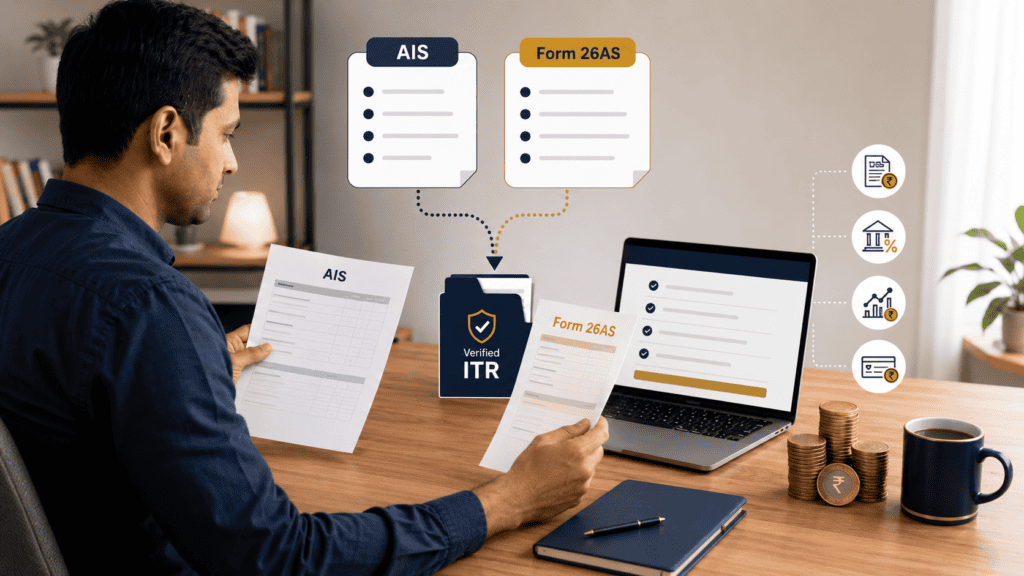
Every year, thousands of salaried employees file their ITR with one document open on the screen — usually Form 26AS — and assume that is the full picture. It is not. Since FY 2020–21, the Income Tax Department introduced AIS, the Annual Information Statement, which reports far more than TDS. If your AIS shows ₹2.4 lakh in fixed deposit interest and your ITR does not, the department already has a mismatch flagged before you even click Submit. The question is not whether to check AIS or Form 26AS — it is knowing what each document does, and using both correctly before filing.
This guide explains the AIS vs Form 26AS difference in plain language, shows you exactly how to reconcile them, and walks through the mismatch situations that delay refunds or trigger notices.
Quick Answer: AIS vs Form 26AS
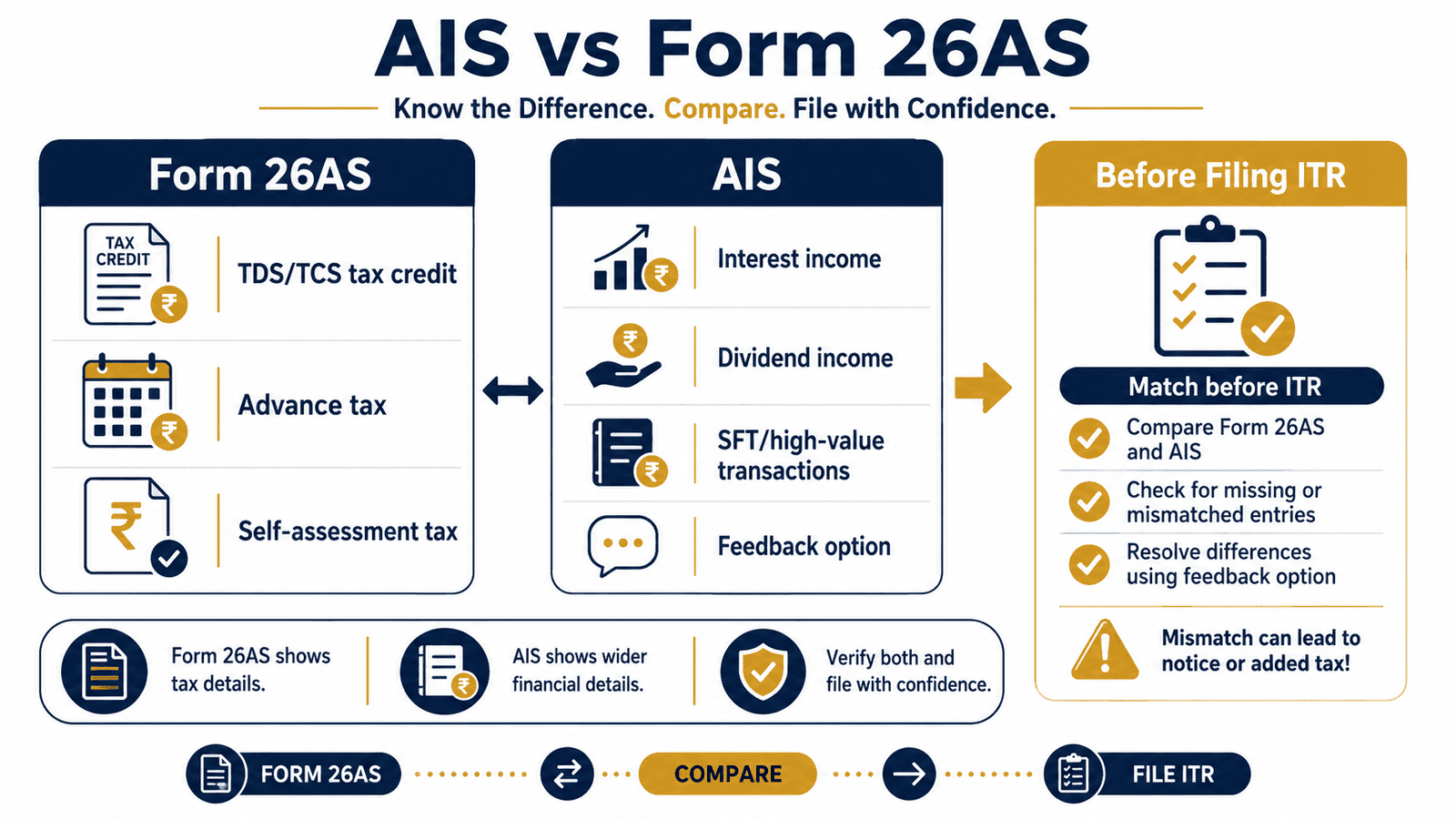
AIS vs Form 26AS matters because Form 26AS mainly helps verify tax credits such as TDS and TCS, while AIS gives a wider view of reported financial information. Before filing ITR, check both records, compare them with Form 16 and bank statements, and resolve mismatches through the income tax portal.
Key Takeaways
- Form 26AS is a tax credit statement — it shows TDS deducted, TCS collected, advance tax paid, and self-assessment tax. These figures directly determine your refund or tax due at the time of ITR filing.
- AIS (Annual Information Statement) consolidates financial data from multiple sources — banks, brokers, registrars, and employers — and reports income, interest, dividends, capital gains, and more, whether or not TDS was deducted.
- TIS (Taxpayer Information Summary) is part of AIS and gives you a clean, category-wise summary of reported values and modified values after any feedback you submit.
- If your AIS shows ₹60,000 in savings account interest but your ITR shows ₹0, the income tax system will detect the mismatch — even if no TDS was deducted on that amount.
- The ITR prefilled data on the e-filing portal is drawn primarily from AIS and Form 26AS — which is why verifying both before filing avoids auto-populated errors.
- You can submit feedback on AIS entries directly on the income tax portal if a figure is incorrect, duplicated, or does not belong to you — always do this before finalising the ITR.
- For salaried employees, the reconciliation order is: Form 16 → Form 26AS → AIS → ITR prefilled data. All four must align before filing.
AIS vs Form 26AS: Full Comparison
| Parameter | Form 26AS | AIS (Annual Information Statement) |
|---|---|---|
| Primary purpose | Verify TDS, TCS, and tax paid credits | View all financial transactions reported about you |
| What it shows | TDS deducted, TCS collected, advance tax, self-assessment tax, refunds issued | Salary, interest, dividends, capital gains, SFT transactions, foreign remittances, GST turnover, rent received, and more |
| Data sources | Deductors (employers, banks) and tax payment challans | Employers, banks, mutual funds, registrars, brokers, insurance companies, and SFT filers |
| TDS credit reflection | Yes — primary source | Yes — also included |
| Income reporting (non-TDS) | No | Yes — FD interest, dividends, capital gains |
| SFT (Statement of Financial Transactions) | Partially (high-value transactions) | Full SFT data — mutual fund purchases, property, credit card spend above threshold |
| Taxpayer feedback option | No | Yes — dispute, correct, or mark as not applicable |
| Linked to ITR prefill | Partially | Primary source for ITR prefilled data |
| Where to access | incometax.gov.in or TRACES (tdscpc.gov.in) | incometax.gov.in → AIS portal |
| Format includes TIS | No | Yes — TIS is a summary tab within AIS |
Key Facts at a Glance
| Item | Detail |
|---|---|
| When AIS was introduced | November 2021 (for FY 2020–21 data) |
| Where Form 26AS is available | incometax.gov.in and TRACES portal (tdscpc.gov.in) |
| Where AIS is available | incometax.gov.in → Services → AIS |
| TIS meaning | Taxpayer Information Summary — a category-wise summary within AIS showing reported vs modified values |
| AIS feedback window | Available year-round; feedback updates TIS modified value |
| ITR prefill data drawn from | Primarily AIS; also Form 26AS for tax credits |
| TDS credit authority for refund | Form 26AS (and AIS) — both must match ITR for correct refund processing |
| Applicable assessment years | AY 2021–22 onwards for AIS; Form 26AS available for earlier years too |
Understanding AIS, Form 26AS, and TIS — What Each One Does
Most people treat Form 26AS and AIS as interchangeable. They are not. They serve different purposes, carry different data, and require different actions from you before filing ITR.
What Form 26AS Actually Is
Form 26AS is the tax credit statement maintained by the Income Tax Department. Think of it as your official ledger of tax already paid against your PAN — whether deducted at source, collected at source, or paid by you directly. According to the Income Tax Department at incometax.gov.in, Form 26AS reflects TDS deducted by your employer, bank, or any other deductor; TCS collected by sellers of vehicles, foreign exchange, or other goods; advance tax you paid during the financial year; and self-assessment tax paid before or during filing.
When your ITR is processed, the tax department matches your claimed TDS credits with Form 26AS. If they do not match, your refund can be held or reduced. This is why Form 26AS has always been the critical document at the time of filing — not because it shows all your income, but because it shows the tax the government has already received on your behalf.
Form 26AS also shows details of any income tax refund issued to your PAN, which is useful to confirm whether last year’s refund was processed correctly. For salary income, checking that your employer has correctly deposited the TDS shown in Form 16 details against Form 26AS is one of the most important pre-filing steps you can take.
What AIS Actually Is
AIS stands for Annual Information Statement. It was introduced by the Income Tax Department in November 2021 and is available on the e-filing portal under Services → AIS. It consolidates financial information reported to the department by dozens of entities — your employer, banks, mutual funds, depositories, registrars, stock brokers, insurance companies, and anyone required to file a Statement of Financial Transactions (SFT).
The key difference is scope. AIS captures income whether or not TDS was deducted. If your savings account credited ₹85,000 in interest across the year, AIS will show it even if the bank never deducted TDS (which banks do not if the interest is under ₹40,000 per year for most individuals). If you received ₹1.2 lakh in dividends, AIS shows it. If you sold mutual fund units with short-term capital gains of ₹45,000, AIS shows it. Form 26AS would not necessarily capture any of these if no TDS applied.
AIS is divided into multiple sections: salary, interest (savings and deposits), dividends, securities transactions, mutual fund transactions, foreign remittances, GST turnover if applicable, and SFT-reported high-value transactions. Each entry shows a reported value (what the third party submitted) and — after any feedback from you — a modified value.
What TIS Is and Why It Matters
TIS, the Taxpayer Information Summary, is a tab within the AIS portal. It is not a separate document. TIS aggregates all the AIS data by income category and shows you two values for each: the reported value (raw data from filers) and the modified value (adjusted after any feedback you submitted). The TIS modified values are what the income tax portal uses to prefill your ITR. If TIS shows ₹95,000 in interest income after your feedback, that is the figure that populates the ITR automatically.
This matters because if you do not log in and check AIS and TIS before filing, you may be filing an ITR built on prefilled figures that include errors, duplicates, or transactions that belong to someone else with the same PAN by mistake.
How AIS Data Feeds ITR Prefilled Data
When you open your ITR on the income tax portal, you will see a prefilled version with salary, TDS, tax payments, and some income fields already filled. Most of this comes from AIS and Form 26AS. The salary and TDS credit comes from your employer’s TDS returns (reflected in both Form 26AS and AIS). Interest and dividend income comes from AIS. Capital gains data, if applicable, also flows from AIS broker and depository data.
Accepting prefilled data without checking it against your actual documents is one of the most common ITR filing errors. Use the TDS on salary guide to understand exactly what your employer should be depositing, and cross-check that figure against both Form 16 and Form 26AS before accepting the prefill.
Real Example: Rahul in Bengaluru Finds a ₹14,200 Mismatch
Rahul Sharma, 31, a software engineer in Bengaluru earning ₹18 lakh per year, opens his ITR for AY 2025–26. He downloads his Form 16 from his employer: TDS deducted ₹1,04,000. He checks Form 26AS: TDS credited against his PAN is ₹1,04,000. So far, so good.
Then he checks his AIS. Under “Interest — Savings Account,” AIS shows ₹62,400 in interest across two banks. He had earned this but had not planned to declare it, assuming no TDS meant no reporting. AIS also shows ₹28,000 in dividends from mutual funds. Neither figure appears in the ITR prefilled data correctly — one bank had filed the SFT data with a slight mismatch in PAN.
Rahul submits feedback on the mismatched bank entry through the AIS portal, correcting it. The TIS modified value updates. His final ITR shows total income of ₹19,32,400 instead of the ₹18,40,000 he had initially assumed. The additional ₹92,400 in interest and dividends results in ₹14,200 in additional tax payable at his slab rate. Had he filed without checking AIS, a mismatch notice would have arrived within months. Use the income tax calculator to estimate how additional income from savings accounts and dividends affects your total tax liability.
How to Decide What’s Right for You
You are a salaried employee with no other income — THEN check Form 26AS to verify TDS credit, and scan AIS for any interest or dividend income your employer did not account for in Form 16.
Your ITR prefilled data shows income you do not recognise — THEN log into AIS, find the entry, and check the reporting entity name. If it is wrong, submit feedback before filing. See the ITR filing checklist for the complete pre-filing document workflow.
Your Form 26AS TDS credit is lower than what Form 16 shows — THEN your employer may not have deposited the TDS. Do not file until this is resolved; a credit mismatch means the refund will be reduced by the unmatched amount.
AIS shows capital gains from mutual fund redemptions or stock sales — THEN verify whether you need to file ITR-2 instead of ITR-1, using the Choose ITR form guide to determine the correct form based on your AIS data.
AIS shows an SFT entry for property purchase, credit card spend, or mutual fund purchases above threshold — THEN review whether these transactions are correctly reported. These do not create tax liability by themselves but may be used for scrutiny matching.
Your Form 26AS shows excess TDS and you expect a refund — THEN confirm the TDS figures match your Form 16 exactly before filing. See the Claim tax refund guide for what happens after filing if a mismatch delays your refund.
You have already submitted feedback on a disputed AIS entry but TIS has not updated yet — THEN do not file ITR immediately. Wait for the feedback to reflect in TIS modified values; filing with stale prefilled data can introduce a mismatch you cannot easily correct post-filing.
Common Mistakes to Avoid
Relying on Form 26AS alone and ignoring AIS
Form 26AS does not show all your income — only tax credits.
If you earn FD interest of ₹75,000 on which TDS was deducted below ₹40,000 threshold, Form 26AS may show no TDS on it — but AIS will show the full ₹75,000 as reported interest. Filing without declaring it creates a mismatch the department will detect. A notice under Section 143(1) or Section 148A can follow, adding interest under Section 234A.
Always open AIS first, then Form 26AS, then Form 16 — in that order of breadth.
Filing ITR without checking AIS feedback status
If you submitted feedback on an incorrect AIS entry, TIS takes time to update the modified value.
Filing before the TIS modified value reflects your correction means the ITR is based on an uncorrected figure. The department processes ITR against the AIS data it has at the time of processing — not at the time you filed.
Log back into AIS after a day or two and confirm TIS shows the modified value you expect before proceeding.
Accepting prefilled ITR data without checking AIS source entries
The prefilled ITR comes from AIS and Form 26AS — but errors in reporting by third parties flow directly into your ITR.
A bank filing SFT data with a wrong PAN suffix, or a mutual fund reporting a redemption twice, will appear in your prefilled ITR as excess income. At ₹30% slab, ₹1 lakh in duplicated income costs ₹31,200 in tax you do not owe.
Never click “accept all” on prefilled data. Verify each income category against your own records.
Ignoring the Form 16 vs AIS salary mismatch
Your employer files TDS returns quarterly. AIS salary data reflects those TDS filings.
If your employer revised a salary component mid-year, made a correction in a later quarter TDS return, or processed a variable pay in a different month, AIS salary figure may differ from your actual Form 16 Part B gross salary. File based on Form 16 amounts for salary — but flag and reconcile any difference over ₹5,000 before proceeding.
For salaried employees, Form 16 is the primary document for salary income, not AIS.
Treating AIS mismatch as automatic income addition
An AIS entry does not automatically mean you owe tax on it — it means a third party reported it against your PAN.
If a transaction does not belong to you (incorrect PAN match, joint account income fully attributed to you, etc.), submit the correct feedback in AIS. Filing ITR with incorrect AIS-inflated income results in paying tax you did not owe, and recovering it requires revised ITR or refund claims. Claim tax refund explains how to recover overpaid tax after filing.
Confusing TIS modified value with confirmed value
The TIS modified value reflects your feedback — but it is not automatically accepted by the income tax department.
The department retains the right to assess original reported values during scrutiny if your feedback is not supported by documentary evidence. Submit feedback with a correct reason code, and keep the supporting documents (bank statements, broker statements) ready in case of a query.
Missing the AIS check for high-value SFT transactions
Banks, registrars, and mutual fund companies are required to report transactions above specified thresholds in SFT filings — property purchases above ₹30 lakh, mutual fund investments above ₹10 lakh in a year, and others.
These do not create direct tax liability but appear in AIS and may be used to cross-check your declared income. If your AIS shows a ₹32 lakh property purchase and your declared income is ₹8 lakh, you may receive a scrutiny notice. Check SFT entries before filing, especially in high-value transaction years.
When This May Not Be the Right Choice
AIS is a powerful tool — but there are situations where over-relying on AIS data without corroborating your own records can lead to errors in filing.
If you have a joint bank account where the full interest is being attributed to your PAN alone — even though you hold only 50% — AIS will still show the full amount. Filing based on that figure means you pay tax on income that belongs partly to the other account holder.
If you are a freelancer or business owner with turnover reported under GST-SFT, AIS may show gross receipts that include GST collected. Your taxable income is not the gross SFT figure — it is net of GST and deductible business expenses. Filing based on the AIS gross figure without adjustment creates an inflated income declaration.
If AIS shows capital gains from a demat account you closed or transferred to a family member, and the reporting entity has used your old PAN linkage, you may see transactions that are not yours. Always verify against your own broker statements.
If any of these apply to your situation, it may be worth exploring alternatives before committing.
Official Rules and Where to Verify
AIS, Form 26AS, and TIS are maintained by the Income Tax Department of India. Rules, limits, and rates on this topic can change with each Budget or regulatory update. Always verify current figures directly from the official source before making any financial decision.
- Income Tax Department — incometax.gov.in (e-filing portal for AIS, Form 26AS, ITR filing)
- Income Tax Department — incometaxindia.gov.in (official rules, circulars, and notifications)
- TRACES / TDS-CPC — tdscpc.gov.in (Form 26AS download, TDS credit verification)
Expert Tips
- Download your AIS PDF and Form 26AS at least two weeks before filing ITR — processing AIS feedback and TIS updates takes time, and the last week of July is the worst time to discover a mismatch.
- Cross-check AIS interest income category-wise: savings account interest goes under “Other Sources,” FD interest goes under “Other Sources,” but PPF interest is exempt and should not be added even if it appears in AIS. Know the exemption rules before adding every AIS figure to your ITR.
- If AIS shows dividend income from equity mutual funds or stocks, verify the ex-dividend date falls within the assessment year you are filing for. Dividends credited in April (next FY) are sometimes reported in the current AIS incorrectly.
- Use the AIS feedback feature strategically: the reason codes include “Income is not taxable,” “Duplicate entry,” “Income belongs to other person,” and “Rate of TDS is incorrect.” Choosing the wrong reason code delays resolution — read each option before submitting.
- For salaried employees with only salary and bank interest, reconcile in this exact order: Form 16 gross salary → AIS salary figure → Form 26AS TDS credit → AIS interest income → ITR prefill. Four documents, fifteen minutes, zero mismatch risk.
- If Form 26AS shows a TDS entry from a deductor you do not recognise (unfamiliar TAN), do not ignore it — it could be a bank branch that deducted TDS on an FD you forgot, or an error against your PAN. Contact the deductor for Form 16A before filing.
- AIS data is updated periodically — not in real time. If a transaction from March has not appeared in AIS by June, it may still be added later. File with the documents you have, but keep records for at least 6 years in case of a delayed AIS update triggering scrutiny.
Frequently Asked Questions
What is the main difference between AIS and Form 26AS?
Form 26AS is a tax credit statement showing TDS deducted, TCS collected, and taxes you paid directly. AIS is a broader financial information statement covering salary, interest, dividends, capital gains, SFT transactions, and more — whether or not TDS was deducted. For ITR filing, you need both: Form 26AS to verify tax credits, and AIS to verify income completeness.
Which document should I use for TDS credit when filing ITR?
Form 26AS is the primary document for TDS credit verification. It shows the exact TDS amount credited against your PAN by each deductor. AIS also reflects TDS data, but Form 26AS remains the authoritative source the income tax department uses to process refunds and match credits during ITR processing.
What is TIS in income tax and how is it different from AIS?
TIS stands for Taxpayer Information Summary. It is a tab within the AIS portal — not a separate document. TIS shows a category-wise summary of all AIS entries, with two columns: reported value (what third parties submitted) and modified value (updated after your feedback). The TIS modified value is used to populate ITR prefilled data. AIS is the detailed view; TIS is the summarised view.
Can I file ITR based only on AIS without checking Form 26AS?
Not advisable. AIS includes TDS data but the definitive tax credit matching during ITR processing is done against Form 26AS. If there is a difference between TDS shown in AIS and Form 26AS, it could be due to timing — Form 26AS may reflect a correction filed later by your deductor. Always check both before filing to ensure the TDS credit you claim in ITR matches Form 26AS exactly.
What should I do if AIS shows income I have not earned?
Log into the income tax portal, go to AIS, find the specific entry, and submit feedback. Select the correct reason code — for example, “Income does not pertain to me” or “Duplicate entry.” The TIS modified value will update after the feedback is processed. Do not file ITR until TIS reflects the corrected figure. Keep supporting documents (bank statements, broker confirmations) ready.
Is it mandatory to check AIS before filing ITR?
There is no legal mandate specifically requiring AIS review before filing. However, since ITR prefilled data draws from AIS, filing without checking it means accepting potentially incorrect income figures. The income tax department cross-matches your filed ITR against AIS data during processing. A mismatch can trigger a defective return notice under Section 139(9) or a demand under Section 143(1). Checking AIS is a practical necessity, not just a recommendation.
What happens if Form 26AS TDS does not match my Form 16?
This usually means your employer filed a quarterly TDS return with a different figure, or corrected it after issuing Form 16. Contact your employer’s payroll or accounts team immediately. Do not file until Form 26AS reflects the TDS shown in your Form 16. Filing with a TDS claim not supported by Form 26AS will result in the excess being rejected, reducing your refund or increasing your tax due. Check our TDS on salary guide for how employer TDS deposits work.
Does AIS show FD interest even if TDS was not deducted?
Yes. Banks report interest credited to accounts in their SFT filings and TDS return data, irrespective of whether TDS was actually deducted. If your total FD interest across all bank branches is under the TDS threshold (₹40,000 for most individuals), the bank may not deduct TDS — but AIS will still reflect the full interest earned. You must declare this in your ITR under “Income from Other Sources.”
Can AIS have duplicate entries?
Yes, this happens. If a bank or depository files SFT data and also separately submits TDS data for the same transaction, AIS may show the same income twice. Similarly, if you transferred shares between demat accounts, both accounts may report the transaction. Use the “Duplicate entry” feedback reason in AIS when this occurs. Always reconcile AIS against your own bank and broker statements to identify duplicates before filing.
What is the assessment year I should be looking at in AIS when filing for FY 2024–25?
When filing your ITR for FY 2024–25, you are filing for Assessment Year 2025–26. AIS on the income tax portal allows you to select the relevant assessment year. Make sure you are viewing AIS for AY 2025–26 when reconciling income and TDS for the financial year ending March 31, 2025. Checking the wrong assessment year is a common but avoidable error.
Final Verdict
AIS vs Form 26AS is not an either-or choice — they are two different documents solving two different problems. Form 26AS is where you verify that every rupee of TDS deducted is actually credited against your PAN, making it essential for refund accuracy. AIS is where you verify that your total reported income is complete and correct, covering everything from savings interest and dividends to capital gains and SFT-reported transactions.
For salaried employees, the smart pre-filing workflow is: Form 16 for salary figures, Form 26AS for TDS credits, AIS for complete income picture, and TIS to confirm prefilled ITR values are accurate. Spending thirty minutes on this reconciliation before filing is the single best way to avoid mismatch notices, delayed refunds, and scrutiny queries. For help estimating your tax after this reconciliation, the income tax calculator gives you a regime-wise comparison once you have the correct income figures.
Always verify the latest rules from official sources or consult a qualified professional before making any financial decision.
This article is for educational purposes only and should not be treated as personalised financial, tax, investment, insurance, or legal advice. Tax rules, interest rates, regulatory limits, and product features can change with each Budget or policy update. Please verify current rules from official government sources or consult a qualified and registered professional before making any financial decision.

Kavita Mehra writes and edits Ridhi.com’s income tax content for Indian taxpayers, with a special focus on salaried employees and beginners who find tax rules confusing. Her work explains complex tax topics in simple language, helping readers understand how income, deductions, exemptions, rebates, TDS, Form 16, ITR filing, and refunds connect in real life.
She covers topics such as old vs new tax regime, income tax slabs, standard deduction, Section 87A rebate, HRA exemption, 80C, 80D, 80E, 80G, TDS on salary, taxable income, Form 16, AIS, Form 26AS, advance tax, and ITR filing checklists. Her content aims to help readers become more informed before filing returns or discussing tax matters with a professional.
Kavita’s approach is careful, compliance-focused, and official-source oriented. Because Indian tax rules can change after Budgets, circulars, and policy updates, her articles encourage readers to verify current figures, filing deadlines, and rules from the Income Tax Department or a qualified tax professional before acting.