

Every April, millions of salaried employees across India face the same question: old regime or new regime — which one actually saves more tax? For FY 2025-26 (Assessment Year 2026-27), that question matters more than ever. The Income Tax Department has changed how the default regime works, and a straightforward salary of ₹12 lakh can produce very different tax numbers depending on which regime you use, and more importantly, which deductions you are actually eligible to claim. An income tax calculator india fy 2025-26 can help — but only if you feed it the right inputs. Enter CTC instead of taxable salary, forget a deduction, or ignore TDS already deducted by your employer, and the calculator output becomes useless. This article explains every input, walks through a real example, and shows you exactly where to verify the numbers before you file.
Quick Answer: Income Tax Calculator India FY 2025-26
Income tax calculator india fy 2025-26 helps salaried taxpayers compare old and new regime tax by entering salary, deductions, HRA, standard deduction, and rebate details. For example, a ₹12 lakh salary can produce different tax payable under each regime. Always verify current standard deduction limits, Section 87A rebate eligibility, slab rates, and cess from incometax.gov.in before relying on any calculator result for filing.
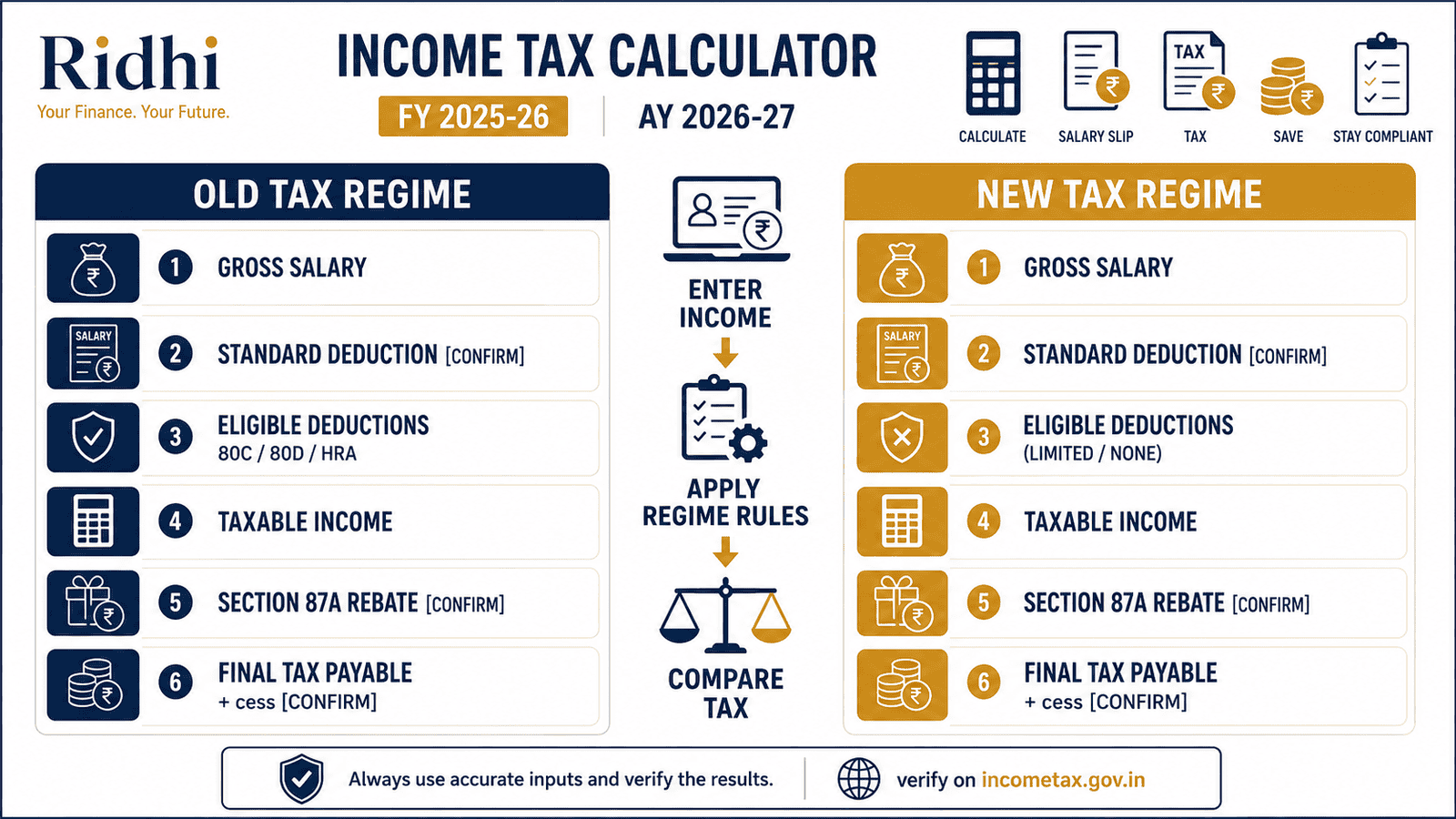
How to Calculate Income Tax for FY 2025-26
An income tax calculator follows a fixed sequence. Understanding each step helps you spot where your inputs could go wrong — and why the old and new regime outputs diverge.
Tax Payable = (Taxable Income × Applicable Slab Rate) − Section 87A Rebate + Surcharge (if applicable) + 4% Health and Education Cess
Step 1: Enter Gross Salary and Other Income
Start with your gross salary — not CTC. Gross salary is the amount your employer pays before any deductions, found on your salary slip or Form 16 Part B. Add any other income: interest from savings accounts, fixed deposits, rental income, or freelance earnings. Do not add capital gains or business income here — those need separate treatment.
Step 2: Subtract Eligible Exemptions and Deductions
This step is where old and new regimes split. Under the old regime, you can subtract HRA exemption, standard deduction, Section 80C investments up to ₹1.5 lakh, Section 80D health insurance premiums, home loan interest under Section 24(b), and several other deductions. Under the new regime, most of these deductions are not available — the regime instead offers lower slab rates and a standard deduction. Verify the exact deduction list applicable for FY 2025-26 from incometax.gov.in before finalising your inputs.
Step 3: Apply the Applicable Slab Rates
Once taxable income is calculated, the relevant slab rates apply. The old regime and new regime have different slab structures for FY 2025-26. Do not use slab tables from articles or calculators without confirming them directly from the Income Tax Department for the current financial year, as Budget changes can alter the slabs.
Step 4: Apply Rebate, Surcharge, and Cess
After base tax is calculated, check whether Section 87A rebate applies to your income level — this can reduce final tax payable to zero for eligible taxpayers. Surcharge applies at higher income levels above specified thresholds. Health and education cess is then added. Verify all three from incometax.gov.in — all three figures are subject to Budget change. Section 87A rebate eligibility depends on your final taxable income, not gross salary.
Step 5: Compare Final Tax Payable with TDS Already Deducted
The calculator shows your estimated tax liability for the full year. Your employer deducts TDS (Tax Deducted at Source) every month based on their estimate of your annual salary and declared investments. If the final tax payable is less than TDS deducted, you get a refund. If it is more, you pay the balance at the time of filing.
Key Takeaways
- For FY 2025-26, income earned between April 1, 2025 and March 31, 2026 must be reported in AY 2026-27 — make sure your calculator is set to the correct financial year before reading results.
- The new regime has become the default for most salaried employees, but running the old regime comparison is still worth doing if you have substantial 80C, 80D, HRA, or home loan deductions.
- Standard deduction reduces your taxable salary before slab rates apply — verify the current FY 2025-26 standard deduction amount from incometax.gov.in before entering it as a calculator input.
- Section 87A rebate can bring final tax payable to zero for eligible taxpayers — the income eligibility threshold differs between old and new regimes and must be confirmed before filing.
- TDS deducted by your employer is not your final tax — the calculator helps you spot the gap between TDS and actual tax liability, which determines your refund or balance due.
- Entering CTC instead of gross taxable salary is the single most common calculator mistake — it overstates income and produces a higher (incorrect) tax estimate.
- All slab rates, surcharge thresholds, cess rates, and deduction limits for FY 2025-26 must be verified from incometax.gov.in — they are subject to change with each Union Budget.
Key Facts at a Glance
| Parameter | Old Regime | New Regime |
|---|---|---|
| Financial Year | FY 2025-26 | FY 2025-26 |
| Assessment Year | AY 2026-27 | AY 2026-27 |
| Standard Deduction | Available — verify current amount | Available — verify current amount |
| Section 80C Deduction | Available up to ₹1.5 lakh | Not available |
| HRA Exemption | Available if applicable | Not available |
| Section 87A Rebate | Applicable — verify income threshold | Applicable — verify income threshold |
| Slab Rates | Higher rates, more deductions | Lower rates, fewer deductions |
| Health and Education Cess | 4% on tax payable | 4% on tax payable |
| Official Source | incometax.gov.in |
How an Income Tax Calculator Actually Works
An income tax calculator is not magic — it applies a set of rules to the numbers you enter. Understanding what each input field means is the difference between a useful estimate and a misleading one.
Gross Salary vs Taxable Salary
Many readers open a calculator and type their CTC (Cost to Company). That is wrong. CTC includes employer contributions to PF, gratuity, and other components that are not your actual salary. Your gross salary is the sum of all salary components before deductions — basic, HRA, special allowance, and other allowances — as shown in your salary slip or Form 16. Taxable salary is gross salary after subtracting allowable exemptions (like HRA under the old regime) and the standard deduction. Enter taxable salary into the calculator, not CTC.
The standard deduction meaning is simple: it is a flat deduction from salary income available to all salaried employees, regardless of actual expenses. It reduces your gross salary before slab rates apply. Both old and new regimes now offer a standard deduction — verify the current FY 2025-26 amount from incometax.gov.in before entering it.
Old Regime: Deductions Are the Deciding Factor
Under the old tax regime, your taxable income after all eligible deductions determines whether old or new regime saves more tax. The most common deductions are Section 80C (PPF, ELSS, EPF contribution, life insurance premium, home loan principal — up to ₹1.5 lakh), Section 80D (health insurance premium for self, spouse, children, and parents), HRA exemption if you pay rent, and Section 24(b) for home loan interest. The more legitimate deductions you can claim, the stronger the old regime’s case becomes for your situation. For a detailed breakdown, see old regime deductions for FY 2025-26.
New Regime: Simplicity With Lower Slabs
The new tax regime trades most deductions for lower slab rates. You do not need to track or prove investments — but you also cannot reduce taxable income through 80C, 80D, or HRA. For many salaried employees with modest deduction portfolios, the new regime can result in comparable or lower tax. For a full breakdown of slab rates applicable this year, read the old or new regime comparison guide. The new regime became the default for most taxpayers — meaning if you do not choose a regime explicitly, the new one applies. Confirm this with your employer at the start of the financial year.
Tax Payable vs TDS Deducted
A calculator shows your estimated full-year tax liability. This is different from TDS, which is what your employer has already deducted monthly. If your final liability is ₹42,000 and your employer deducted ₹55,000 in TDS, you are entitled to a refund of ₹13,000 after filing your ITR. If the numbers are reversed, you owe additional tax. The calculator helps you identify this gap before filing.
Real Example: Rohit, Software Engineer, Pune
Rohit, 31, works as a software engineer in Pune with a gross salary of ₹12 lakh per year. He pays rent and has made Section 80C investments. Here is how his income tax calculation looks under both regimes — using illustrative figures for the purpose of this example. All rule-based figures must be verified from incometax.gov.in before applying to actual filing.
Old Regime — Illustrative Calculation:
Gross Salary: ₹12,00,000
Less Standard Deduction: (verify current amount from incometax.gov.in)
Less HRA Exemption (illustrative): ₹1,20,000
Less Section 80C: ₹1,50,000
Less Section 80D (health insurance): ₹25,000
Estimated Taxable Income: approximately ₹8,80,000 (illustrative — actual depends on verified deductions)
Applicable slab tax, rebate, and cess: verify from incometax.gov.in
New Regime — Illustrative Calculation:
Gross Salary: ₹12,00,000
Less Standard Deduction: (verify current amount from incometax.gov.in)
No other deductions available
Estimated Taxable Income: ₹12,00,000 minus standard deduction (verify)
Applicable slab tax, rebate, and cess: verify from incometax.gov.in
The key insight: whether Rohit saves more tax under the old regime depends on whether his total eligible deductions — HRA, 80C, 80D, and any others — are large enough to overcome the old regime’s higher slab rates. A salary tax calculator india tool running both regimes side by side will show the final tax payable number for each — use that comparison to decide, not just the slab chart.
Comparison: Old Tax Regime vs New Tax Regime
| Parameter | Old Tax Regime | New Tax Regime |
|---|---|---|
| Slab Rates | Higher rates | Lower rates — verify FY 2025-26 slabs |
| Standard Deduction | Available | Available |
| Section 80C (up to ₹1.5L) | Available | Not Available |
| Section 80D (Health Insurance) | Available | Not Available |
| HRA Exemption | Available | Not Available |
| Home Loan Interest (Sec 24b) | Available | Not Available |
| Section 87A Rebate | Available — verify threshold | Available — verify threshold |
| Investment Proof Submission | Required | Not Required |
| Best For | High-deduction taxpayers | Low-deduction or simple filers |
For a detailed breakdown of deduction rules under the old regime, see old regime deductions for FY 2025-26.
How to Decide What’s Right for You
Your total eligible deductions (80C + 80D + HRA + home loan interest + others) exceed ₹3–4 lakh — THEN run the old regime calculation carefully; it may produce a lower final tax payable than the new regime at ₹12 lakh or higher salary levels.
You have minimal deductions — no HRA, no home loan, modest 80C investments — THEN the new regime’s lower slab rates may result in lower or comparable tax with far less paperwork.
You are at a salary level where Section 87A rebate may apply under the new regime — THEN verify the current eligibility income threshold from incometax.gov.in; the rebate can bring your total tax payable to zero.
Your employer asks for investment declaration at the start of FY 2025-26 — THEN use both regime estimates from a calculator before submitting your declaration, not after, because switching later in the year can affect your monthly TDS.
You have received Form 16 from your employer — THEN cross-check TDS deducted (Part A) and salary breakdown (Part B) with your calculator inputs to identify any refund or additional tax due. Read your Form 16 carefully before entering figures into any calculator.
Your salary changed mid-year due to increment, bonus, or job change — THEN update your calculator inputs to reflect the actual annual total, not just the current monthly figure multiplied by 12.
Your income is only from salary and bank interest — THEN a standard salary calculator may not be sufficient. If you have capital gains, business income, freelancing income, or foreign income, consult a qualified tax professional or use the official incometax.gov.in filing portal directly.
Common Mistakes to Avoid
Entering CTC Instead of Gross Salary
CTC includes employer PF contribution, gratuity, and other non-salary costs that are not part of your taxable income.
This inflates your estimated taxable income and produces a higher tax figure than you will actually owe. A ₹15 lakh CTC may correspond to a gross salary of ₹12.5–13 lakh — a significant difference.
Use the gross salary figure from your salary slip or Form 16 Part B, not the CTC in your offer letter.
Forgetting That Old-Regime Deductions Do Not Apply to the New Regime
Readers sometimes enter 80C and 80D deductions in a calculator set to the new tax regime.
The calculator may show a misleadingly low tax because it is ignoring regime rules. You end up planning around a tax number that does not apply.
Check which regime your calculator is running before entering any deduction figures.
Ignoring TDS Already Deducted
Your tax liability for the year and the TDS your employer has already deducted are two different numbers.
Forgetting to subtract TDS can make it appear you still owe a large amount, when you may actually be eligible for a refund.
Enter your total TDS (from Form 16 Part A or Form 26AS) into the calculator to see your actual net position.
Using Last Year’s Standard Deduction or Slab Rates
Standard deduction limits, slab thresholds, rebate limits, and surcharge rates can change with each Union Budget.
Applying FY 2024-25 figures to an FY 2025-26 calculation can produce a result that is either higher or lower than your actual liability — both are harmful when you use the figure for planning.
Verify every rule-based figure from incometax.gov.in before using it in your calculation.
Counting Deductions You Have Not Actually Made
Some readers plan to invest ₹1.5 lakh in 80C but have only invested ₹80,000 by the time they run the calculator.
Over-entering deductions understates your actual tax liability. If you file ITR based on an incorrect deduction figure without the actual investment proof, the ITR may be defective.
Enter only deductions you have actually made and can prove with documents.
Confusing Financial Year and Assessment Year
FY 2025-26 is the year in which you earn the income. AY 2026-27 is the year in which you report and file that income.
Setting an online calculator to AY 2025-26 (wrong year) instead of AY 2026-27 can apply incorrect slab rates and rules to your calculation.
Always confirm both the financial year and assessment year settings in a third-party calculator before using its output.
Ignoring Other Income Sources
Many salaried employees earn interest from savings accounts, fixed deposits, or recurring deposits throughout the year. This income is taxable and must be added to salary income before applying slab rates.
Leaving it out understates your total income, which can lead to a tax shortfall and potential interest liability at the time of filing.
Add bank interest and any other income to your calculator inputs, even if the amounts seem small.
When This May Not Be the Right Choice
A standard salary income tax calculator may not be adequate if your income situation is more complex than a single employer salary. If you have capital gains — from equity mutual funds, stocks, or property sale — those are taxed under separate provisions and cannot simply be added to salary income in a basic calculator. Similarly, if you had two employers in FY 2025-26, your TDS split across two Form 16s requires careful consolidation before any calculator gives a reliable estimate.
Taxpayers with freelancing or consulting income, RSUs or ESOPs from a foreign employer, or rental income from multiple properties often need tax computation that goes beyond what a standard income tax calculator covers. In these cases, the calculator result is a rough indicator at best — not a filing-ready figure.
If any of these apply to your situation, it may be worth exploring alternatives before committing.
Official Rules and Where to Verify
Every figure that a calculator uses — tax slabs, standard deduction, Section 87A rebate threshold, surcharge rates, cess, and deduction limits — is subject to change with each Union Budget or CBDT notification. The only authoritative source for FY 2025-26 rules is the Income Tax Department.
- Income Tax Department — incometax.gov.in
Specifically verify before filing: FY 2025-26 slab rates for both old and new regimes, current standard deduction limit, Section 87A rebate eligibility threshold for both regimes, surcharge rates for higher income levels, and the 4% health and education cess applicability. For a clear breakdown of new-regime slabs, see the new regime slabs FY 2025-26 guide.
Rules, limits, and rates on this topic can change with each Budget or regulatory update. Always verify current figures directly from the official source before making any financial decision.
Expert Tips
- Run the old and new regime comparison before your employer’s investment declaration deadline — typically in April or early May. Changing your regime preference after the year has started can affect how much TDS is deducted each month, making your cash flow planning harder.
- Pull your AIS (Annual Information Statement) and Form 26AS from incometax.gov.in before running the calculator — these documents show all income and TDS recorded against your PAN, including interest income you may have forgotten.
- Compare final tax payable, not just taxable income. Two regimes can produce very different slab rates on the same taxable income — the relevant number is always the final figure after rebate and cess.
- If your salary includes variable pay, bonus, or arrears, use the actual annual payout figure — not your fixed monthly salary multiplied by 12. Variable pay received in a lump sum in one quarter can push your income into a higher slab temporarily and affect TDS.
- Keep investment proofs, rent receipts, and insurance premium receipts ready before entering old-regime deductions into the calculator. If you cannot document a deduction, do not count it in your estimate.
- After filing ITR, compare your final self-assessment tax computation with the calculator estimate. A consistent large difference usually means one input — often other income or TDS — is being entered incorrectly. Fix it for next year’s planning.
Frequently Asked Questions
What is the difference between FY 2025-26 and AY 2026-27?
FY 2025-26 (Financial Year 2025-26) is the period April 1, 2025 to March 31, 2026, during which you earn your salary. AY 2026-27 (Assessment Year 2026-27) is the year immediately after — April 1, 2026 to March 31, 2027 — during which you report that income and file your ITR. When using any income tax calculator, always confirm it is set to AY 2026-27 if you are calculating tax for income earned in FY 2025-26.
Is the new tax regime automatically better for salaried employees?
Not necessarily. The new regime offers lower slab rates but removes most deductions. Whether it is better depends on the total deductions you are eligible to claim under the old regime. For taxpayers with high 80C investments, HRA, and 80D premiums, the old regime may still result in lower final tax. Run both regimes in the calculator using your actual numbers — do not assume either regime is better without checking.
Can I switch between old and new regime every year?
Salaried employees with only salary and other non-business income can generally switch between regimes each year at the time of filing ITR. However, the regime you declare to your employer at the start of the year determines your monthly TDS. Switching at the time of filing may result in a refund or additional tax payment. Verify current switching rules from incometax.gov.in, as they can change.
Does the income tax calculator include the standard deduction?
Most reliable online income tax calculators for FY 2025-26 include standard deduction as an automatic input for salaried taxpayers. However, always confirm the standard deduction amount being used in the calculator matches the current FY 2025-26 figure from incometax.gov.in. If the calculator uses an outdated figure, the result will be incorrect.
Why does my employer’s TDS differ from the calculator’s tax estimate?
Your employer calculates TDS based on their estimate of your annual salary and the investment declarations you submitted at the start of the year. The calculator uses the actual figures you enter. Differences arise when your salary changed mid-year, you received a bonus, your investment declarations were inaccurate, or you have other income your employer is unaware of. The calculator helps you spot and reconcile this gap before filing.
What is Section 87A rebate and does it apply to my salary?
Section 87A rebate is a tax rebate that reduces final tax payable to zero for taxpayers whose taxable income is below a specified threshold. The rebate amount and income threshold differ between old and new regimes for FY 2025-26, and both must be verified from incometax.gov.in. Importantly, the rebate applies to tax computed before cess — it does not automatically apply to all income types. Verify eligibility before assuming zero tax.
Can I use a salary tax calculator if I have income from freelancing or FD interest?
You can include FD interest and savings account interest in most salary tax calculators by entering them in the “other income” or “income from other sources” field. Freelancing income is typically taxed as business income and requires separate treatment — including possible advance tax obligations. A standard salary calculator may not handle complex freelance income correctly. For such cases, consult a qualified chartered accountant or use the official filing portal.
What is the health and education cess on income tax?
Health and education cess is currently 4% of the income tax payable (including surcharge, if any). It applies to all taxpayers under both old and new regimes. The calculator adds this after computing base tax and applicable rebate. Verify the current cess rate from incometax.gov.in, as it is subject to change.
Is a taxable income calculator the same as an income tax calculator?
Not exactly. A taxable income calculator helps you calculate your taxable income — gross salary minus deductions and exemptions. An income tax calculator takes that taxable income figure and applies slab rates, rebate, surcharge, and cess to estimate your final tax payable. Many tools combine both functions, but understanding the distinction helps you identify which step is producing an unexpected output.
What documents should I keep ready before using an income tax calculator?
Keep your latest salary slip (for gross salary breakdown), Form 16 Part A (for TDS deducted) and Part B (for taxable income breakdown), investment proof receipts for 80C and 80D, rent receipts and HRA details if applicable, Form 26AS or AIS from incometax.gov.in (for all TDS entries and other income), and bank statements for FD interest. Having these ready before opening the calculator reduces the chance of entering inaccurate figures.
Final Verdict
An income tax calculator india fy 2025-26 is most useful when you treat it as a comparison engine, not an answer machine. Run both the old regime and new regime using your actual gross salary, verified deductions, and correct AY 2026-27 settings — and compare the final tax payable figure, not just taxable income. If your total deductions under the old regime are substantial, the old regime may produce a lower final tax. If your deductions are limited, the new regime’s lower slab rates may work better. There is no single right answer for every salary level. The decision depends on your specific income mix, deductions, and HRA situation. For most salaried employees wanting simplicity, the old or new regime comparison guide can help sharpen the decision after the calculator gives you the numbers. Always verify the latest rules from official sources or consult a qualified professional before making any financial decision.
This article is for educational purposes only and should not be treated as personalised financial, tax, investment, insurance, or legal advice. Tax rules, interest rates, regulatory limits, and product features can change with each Budget or policy update. Please verify current rules from official government sources or consult a qualified and registered professional before making any financial decision.

Kavita Mehra writes and edits Ridhi.com’s income tax content for Indian taxpayers, with a special focus on salaried employees and beginners who find tax rules confusing. Her work explains complex tax topics in simple language, helping readers understand how income, deductions, exemptions, rebates, TDS, Form 16, ITR filing, and refunds connect in real life.
She covers topics such as old vs new tax regime, income tax slabs, standard deduction, Section 87A rebate, HRA exemption, 80C, 80D, 80E, 80G, TDS on salary, taxable income, Form 16, AIS, Form 26AS, advance tax, and ITR filing checklists. Her content aims to help readers become more informed before filing returns or discussing tax matters with a professional.
Kavita’s approach is careful, compliance-focused, and official-source oriented. Because Indian tax rules can change after Budgets, circulars, and policy updates, her articles encourage readers to verify current figures, filing deadlines, and rules from the Income Tax Department or a qualified tax professional before acting.