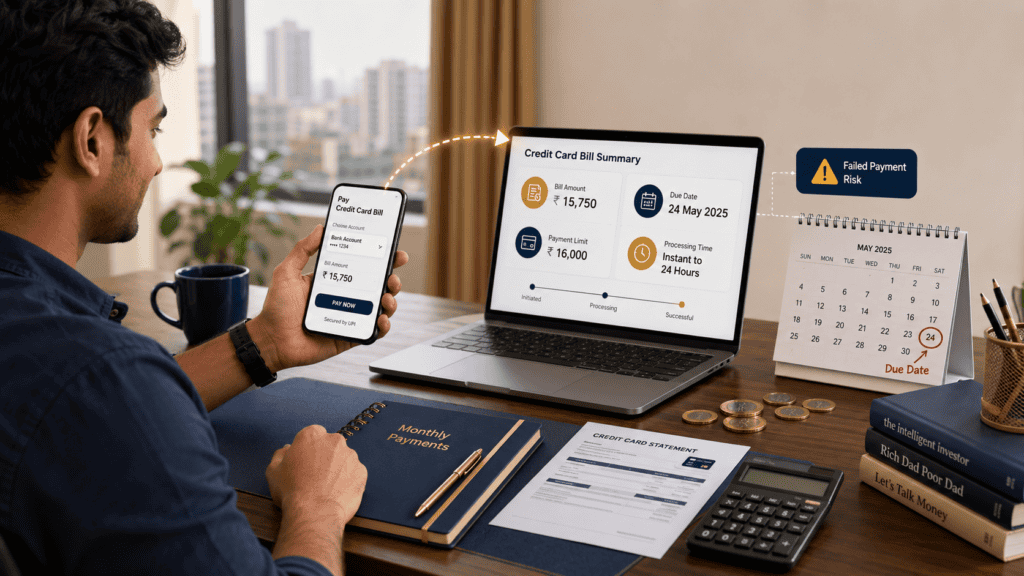
Most Indians now pay their credit card bills through UPI apps — it takes under a minute, and your bank account is right there. But convenience and safety are not the same thing. A UPI debit confirmation is not the same as your card issuer posting the payment. Miss that distinction, and you could face a late fee, interest charges, or a CIBIL hit — even though your money left your account on time.
This article explains exactly how credit card bill payment via UPI works, what charges and limits apply, how settlement timing can catch you off guard, and what to do when a payment fails. Read this before your next due date — especially if you usually pay on the same day or the night before.
Quick Answer: Credit Card Bill Payment via UPI
Credit card bill payment via UPI lets you pay your card dues from a bank account using UPI or BBPS-enabled apps. Charges, limits, and settlement time can vary by app, bank, and card issuer. Pay at least 1–2 working days before the due date to avoid late-fee risk. Always save your UTR number as proof and verify the payment has posted to your card account — not just that the debit appeared in your bank account.
Key Takeaways
- A successful UPI debit does not always mean your card account is immediately updated — settlement and posting can take additional time depending on the issuer and payment route.
- UPI transaction limits vary by bank and app; if your credit card bill exceeds your applicable per-transaction or daily UPI limit, the payment may fail or require a different method.
- Charges for credit card bill payment through UPI vary by platform — some third-party apps may levy a convenience fee; always check before paying.
- Always save the UTR number, debit SMS, app receipt, and a screenshot of the confirmation screen as proof of payment.
- Paying only the minimum amount due instead of the total due leads to heavy interest on the remaining balance — do not confuse the two amounts.
- Do not wait until the due date evening to pay via a third-party UPI app — processing delays could push posting to the next business day.
- If your UPI debit succeeds but the card bill remains unpaid, raise a dispute ticket with the payment app and card issuer immediately, citing your UTR number.
Key Facts at a Glance
| Payment Route | Typical Charge / Timing | Verify Before Paying |
|---|---|---|
| UPI via card issuer’s own app | Usually free; posting often faster | Confirm on issuer’s official app or website |
| BBPS-enabled third-party UPI app (GPay, PhonePe, Paytm) | Often free; convenience fee possible; settlement may take time | Check app’s payment page for any listed charge |
| Net banking (issuer’s own portal) | Typically free; generally same-day posting | Check issuer’s net banking help section |
| NEFT / IMPS transfer to card account | Usually free from most banks; IMPS is near-instant | Confirm payee account details with issuer |
| Auto-debit (NACH mandate) | Free; deducts automatically on due date | Ensure sufficient balance on debit date |
| Payment buffer recommended | 1–2 working days before due date | Verify issuer’s specific posting cut-off time |
To understand the exact amounts listed on your bill — total due, minimum due, and statement balance — see how to read your card statement before you initiate any payment.
How Credit Card Bill Payment via UPI Works in India
When you open a UPI app and choose to pay a credit card bill, the process looks simple on screen. Underneath, several things are happening at once — and each step is a point where a delay or failure can occur.
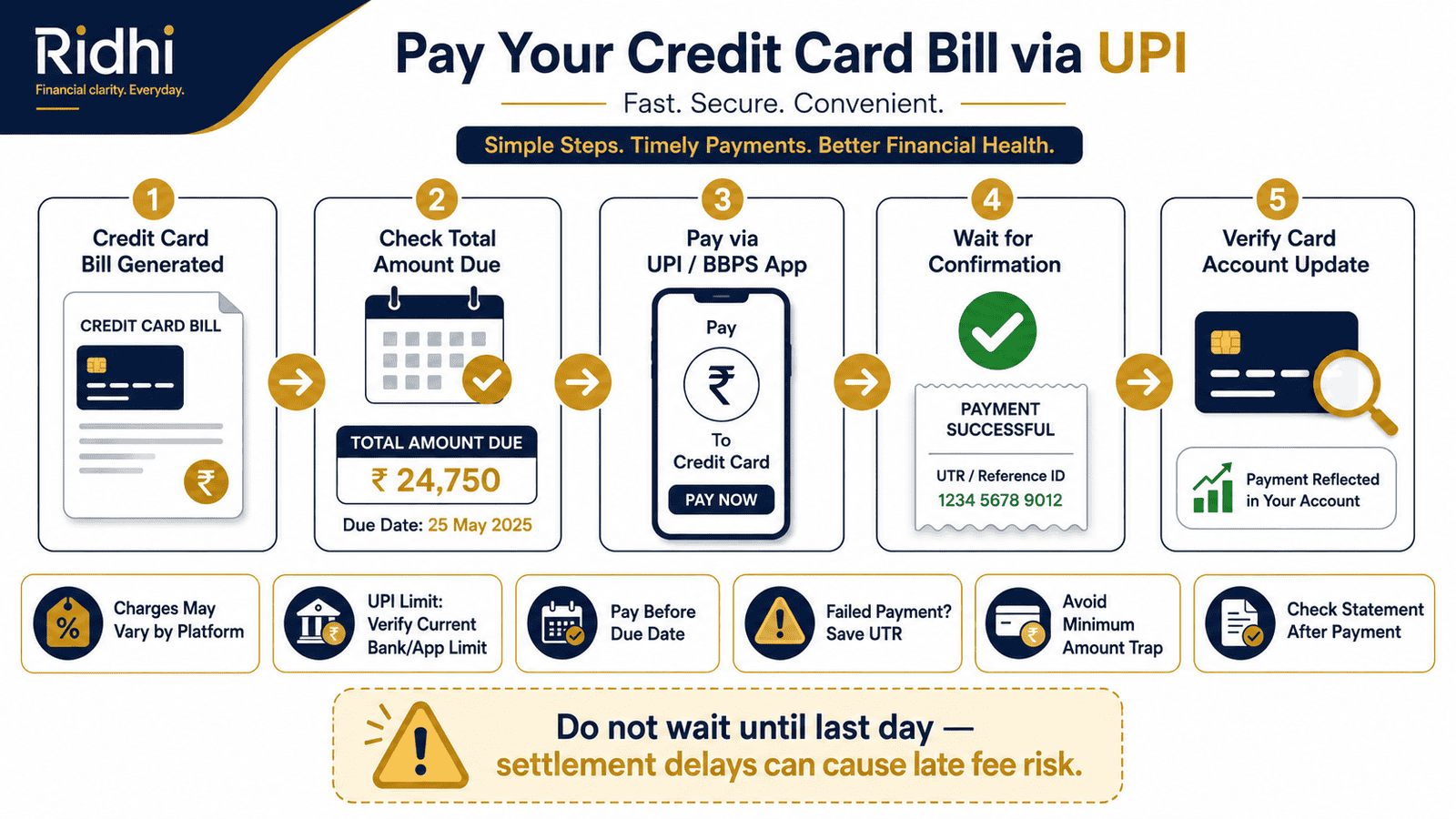
Step 1: You Initiate the Payment
You select your credit card biller in the UPI app, enter the amount, and authenticate with your UPI PIN. At this point, the instruction to debit your bank account is sent. Your bank sends a debit confirmation — this is the moment your bank balance drops.
Step 2: BBPS Routes the Payment to the Issuer
Most credit card bill payments through third-party UPI apps travel through the Bharat Bill Payment System (BBPS), which is operated by NPCI. According to NPCI guidelines, BBPS acts as an interoperable platform to route bill payments to registered billers — including credit card issuers. The debit from your account and the credit to the card issuer are separate legs of this transaction.
This is the step most readers do not realise exists. Your debit can succeed while the BBPS routing to the issuer is still pending. This is why the payment app shows “processing” after showing a debit confirmation.
Step 3: Card Issuer Posts the Payment
Once the funds reach the card issuer through BBPS or the payment partner, the issuer posts the payment to your card account. This updates your available credit limit and marks the bill as paid. The time between your UPI debit and this final posting varies. It can be near-instant during business hours on working days, or it can stretch to the next business day if the payment is made late at night, on a Sunday, or on a public holiday.
Understanding the card billing cycle helps you plan this gap correctly — especially if your due date falls on a weekend or a public holiday.
Why Debit Confirmation Is Not Enough
Many users treat the UPI success message as proof that the bill is paid. It is proof that your bank account was debited — not that the card issuer received and posted the funds. Always verify payment status on your card issuer’s app or website, or check your next card statement to confirm the payment appears as a credit.
UPI Limits and Large Bills
UPI transaction limits are set by your bank and may be further restricted by the payment app. As of recent data, NPCI has set upper limits for UPI transactions per day, and individual banks can set lower limits for their customers. If your credit card bill exceeds your effective per-transaction UPI limit, the payment will fail. You will need to either split the payment, use NEFT/IMPS, or pay directly through the card issuer’s net banking portal. Always confirm your applicable UPI limit through your bank’s official app or customer care before paying a large bill.
Real Example: Rohan’s Sunday Night Payment
Rohan, 29, a software engineer in Bengaluru earning ₹1.2 lakh per month, has a credit card bill of ₹85,000 due on Monday. On Sunday evening at 10:30 PM, he opens a third-party UPI app, adds the card as a biller, and makes the payment. His bank account is immediately debited. The app shows a green tick and a UTR number.
Monday morning, Rohan checks his card account. The payment is still showing as pending. Because the payment was initiated late on a Sunday night, the BBPS routing and issuer posting did not complete until Monday afternoon — after the bank’s processing cut-off for that morning. His card issuer’s system registered the payment as received on Monday, which was the due date. Technically, the payment posted in time — but Rohan did not know this until he checked the card app. Had the issuer’s cut-off been earlier, or had the app shown “processing” for longer, he might have faced a late fee.
The safer path: Rohan should have paid by Saturday to give two full working days. This is an illustrative scenario — actual timelines vary by issuer, app, and time of payment initiation.
How to Calculate Whether UPI Can Cover Your Full Bill
Before you pay, run this quick check to avoid a failed or partial payment.
Payment Feasibility = Bill Amount vs Applicable UPI Limit vs Available Bank Balance
Step 1: Check your total amount due on the card statement — not the minimum amount due.
Step 2: Check your bank’s per-transaction UPI limit and daily UPI limit. These are visible in your bank’s mobile app under UPI settings, or by contacting customer care.
Step 3: Check your available bank balance, including any hold amounts.
Step 4: If your bill exceeds the UPI limit, plan an alternate method — NEFT, IMPS, or net banking — for the excess amount.
| Scenario | Key Inputs | Result |
|---|---|---|
| Bill within UPI limit, sufficient balance | Bill: ₹42,000 | UPI limit: ₹1 lakh | Balance: ₹55,000 | Single UPI payment works; verify posting after |
| Bill above UPI limit | Bill: ₹1,20,000 | UPI limit: ₹1 lakh | Balance: ₹1,30,000 | Payment may fail or be capped; use NEFT/IMPS for the full amount |
| Insufficient balance | Bill: ₹60,000 | Balance: ₹45,000 | Payment will fail; fund the account first or pay what is available and follow up |
Note: UPI limits referenced above are illustrative. Always verify your applicable limit with your bank and NPCI guidance before paying a large bill.
Comparison: Credit Card Bill Payment Methods
| Method | Speed / Convenience | Risk / Suitability |
|---|---|---|
| UPI via third-party app (BBPS) | Fast initiation; posting may be delayed | Moderate — suitable for regular bills within limits; not ideal for last-minute large payments |
| UPI via card issuer’s own app | Generally faster posting; same-day on working days | Lower risk — direct route to issuer; preferred when available |
| Net banking (issuer portal) | Same-day posting on working days; slightly more steps | Lower risk — reliable; good for large bills |
| NEFT / IMPS | IMPS: near-instant; NEFT: batched settlement | Lower risk — good for amounts above UPI limits; requires correct payee details |
| Auto-debit (NACH mandate) | Automatic on due date; no manual action needed | Conditional — reliable if balance is maintained; risk of bounce charge if balance is low |
| Bank branch / cheque | Slowest; 2–3 working days for cheque clearing | Not recommended for time-sensitive payments; use only as last resort |
How to Decide What’s Right for You
Your bill is within your bank’s UPI limit and you are paying 2+ working days before the due date — THEN UPI via a BBPS app is a convenient and safe option for most users.
Your card issuer has its own UPI-enabled app — THEN use it instead of a third-party app; direct issuer routing reduces the chance of posting delays.
Your credit card bill is above ₹1 lakh or close to your UPI daily limit — THEN use NEFT or IMPS through your bank’s net banking portal to avoid a failed payment.
You reliably maintain a sufficient balance and want a hands-off approach — THEN set up an auto-debit NACH mandate for the full due amount; this eliminates manual payment risk.
Your due date is today and the amount is large — THEN use IMPS or issuer net banking; do not rely on a third-party UPI app for same-day posting certainty.
You are not sure whether UPI bill payment is set up correctly for your specific card issuer — THEN do not use it for the first time on or close to the due date; test it with a small advance payment first and confirm posting before the due date arrives.
Common Mistakes to Avoid
Paying Only the Minimum Amount Due
The minimum amount due is the smallest amount you can pay to avoid a late fee — not to avoid interest.
If you pay only the minimum, your card issuer charges interest on the full outstanding balance from the transaction date — not just the unpaid portion. At typical credit card interest rates in India, this adds up fast. A ₹50,000 balance paid in minimums can cost thousands in interest charges within a few months.
Always pay the total amount due if possible. Read more about the minimum amount trap before your next payment.
Waiting Until the Due Date Evening to Pay via UPI
Paying through a third-party UPI app at 10 PM on the due date is a common mistake.
Even if your bank account is debited immediately, the BBPS settlement and card issuer posting may not complete until the next business day — which is after your due date. This can trigger a late fee and interest charges even though money left your account on time.
Pay at least 1–2 working days before the due date.
Ignoring a Pending or Failed Payment Status
If the UPI app shows “pending” or “processing” for more than a few hours, do not assume it will resolve on its own.
Check your card account. If the payment has not posted and the due date is near, pay through an alternate method immediately — then raise a dispute to recover any duplicate debit once the original payment clears or fails officially.
Not Saving the UTR Number and Proof
If a payment is disputed, the UTR (Unique Transaction Reference) number is your primary proof. Without it, resolving a failed-payment dispute with the app or issuer becomes significantly harder.
Take a screenshot of the UPI confirmation screen, save the debit SMS, and note the UTR number after every credit card bill payment.
Assuming Every Third-Party App Is Free and Instant
Some third-party UPI apps charge a convenience fee for credit card bill payment. This is not always shown prominently. Check the payment screen carefully before confirming, especially for larger bills where even a 1–2% fee adds up materially.
Using an Unregistered or Incorrect Biller
When adding a credit card as a biller in a UPI app, confirm the biller name matches your actual card issuer. Payments routed to an incorrect biller may fail to post to your card account, and recovery can take several working days — pushing your payment past the due date.
Changing Payment Method Mid-Pending
If a UPI payment shows as pending, do not immediately try a second payment through a different app or method without first confirming the status of the first. Double payments can happen, and recovering a duplicate debit takes time and follow-up.
When This May Not Be the Right Choice
UPI is not always the best route for credit card bill payment. Consider an alternate method if any of the following apply to you:
Your bill is above your applicable UPI limit. If your outstanding dues exceed your bank’s per-transaction or daily UPI cap, the payment will fail or be partially processed. In this case, NEFT or IMPS through your bank’s net banking portal is more reliable. Understand what happens to your balance when a payment is delayed by reading about credit card interest rate calculation.
Your due date is within the same day or next day. Same-day UPI payments through third-party apps carry posting delay risk. If the due date is imminent, use your card issuer’s net banking or IMPS for greater certainty.
The app repeatedly shows pending or failure for this biller. Some card issuers are not consistently integrated with all BBPS apps. If you have experienced repeated failures with a specific app and issuer combination, switch to a direct payment route.
You need an immediate written confirmation from your card issuer. UPI apps provide UTR-based confirmation, which is not the same as the card issuer’s own payment acknowledgment. For documentation or legal purposes, pay directly through the issuer’s official channel.
If any of these apply to your situation, it may be worth exploring alternatives before committing.
Official Rules and Where to Verify
UPI rules, BBPS guidelines, credit card payment regulations, and platform charges can change with regulatory updates or bank policy revisions. Always verify current figures directly from the official source before making any financial decision.
- NPCI (npci.org.in) — For UPI transaction limit guidelines, BBPS biller registration, and dispute resolution framework.
- RBI (rbi.org.in) — For credit card regulations, digital payment directions, and consumer protection rules under the RBI’s Framework for Responsible and Ethical Enabling of Credit (RBI credit card directions).
- Your card issuer’s official website or mobile app — For confirmed bill payment methods, accepted UPI routes, processing cut-off times, and late fee schedules specific to your card.
- Your payment app’s support page — For current convenience charges, failed-payment timelines, and dispute filing procedures.
- Your bank’s official app or customer care — For your personal per-transaction and daily UPI limit.
Rules, limits, and rates on this topic can change with each Budget or regulatory update. Always verify current figures directly from the official source before making any financial decision.
Expert Tips
- Pay 1–2 working days before the due date — not the night before. This buffer absorbs BBPS settlement delays and issuer posting times. If your due date falls on a Monday, pay by Thursday or Friday of the previous week.
- Use your card issuer’s own app for bill payment when available. Payments initiated through the issuer’s own UPI or net banking interface travel a more direct route and typically post faster than third-party BBPS payments.
- Save UTR, debit SMS, and a screenshot every time. If a payment is disputed, the UTR number is your primary reference. Raise a dispute ticket with the app and your card issuer on the same day if debit succeeds but the card account is not updated within a few hours.
- Before paying a bill above ₹50,000 via UPI, confirm your limit. Log in to your bank’s UPI settings or call customer care. If the bill exceeds the limit, use IMPS — it is near-instant, available 24/7, and widely supported. For reporting fraud or suspicious transactions related to a payment, read how to handle credit card fraud and disputed transactions.
- Check the payment screen for convenience charges before confirming. Some apps list a fee as a small percentage or flat amount only at the final confirmation step. On a ₹1 lakh bill, even a 1% fee is ₹1,000 — worth noticing before you tap Pay.
- After every payment, check the card app the next morning. Do not rely solely on the UPI app confirmation. Your card account should reflect the payment as a credit. If it does not, act the same day — do not wait for the statement cycle.
- Do not use a third-party UPI app for the first time on your due date. Test the setup with a partial payment earlier in the billing cycle, verify posting, and then use it confidently for the full payment in the next cycle.
Frequently Asked Questions
Is credit card bill payment via UPI free?
It depends on the platform and payment route. Payments made through your card issuer’s own app or BBPS-integrated apps are generally free, but some third-party apps may charge a convenience fee. Always check the final payment confirmation screen for any listed fee before completing the transaction. Charges can change, so verify on the app’s support page before paying.
What is the UPI limit for credit card bill payment?
UPI transaction limits are set by your bank, not by the credit card issuer. As of recent data, NPCI sets an overall ceiling, and individual banks may apply lower limits based on account type or UPI settings. If your credit card bill is large, confirm your current per-transaction and daily UPI limit through your bank’s official app or customer care before initiating payment. Always verify the current limit directly with your bank, as these can change.
Is BBPS credit card bill payment instant?
BBPS routes the payment from your bank account to the card issuer. Your bank account debit may be near-instant, but the card issuer’s posting of the payment can take time — especially outside business hours, on weekends, or on public holidays. Do not treat the UPI success message as confirmation of card posting. Check your card account directly.
What if UPI payment fails but money is debited from my account?
This is called a failed or disputed transaction. Under RBI and NPCI guidelines, if a UPI debit succeeds but the payment does not reach the biller, the amount should be reversed to your bank account within a defined period. Raise a dispute immediately through the payment app using the UTR number, and also inform your card issuer that the payment may be pending. Do not wait — if the due date is close, pay through an alternate method and then follow up to recover the original debit.
Can I pay my credit card bill on the due date via UPI?
You can initiate the payment, but there is a risk that it will not post to your card account before the issuer’s cut-off time for that day. Card issuers have specific cut-off times after which payments received are credited the next business day. Paying on the due date through a third-party UPI app at night increases the chance of a late posting. The safe practice is to pay 1–2 working days before the due date.
Will a failed UPI credit card payment affect my CIBIL score?
A failed UPI payment by itself does not directly affect your CIBIL score. However, if the failure means your credit card bill is not paid by the due date and the card issuer marks the account as overdue or records a late payment, that information will appear on your credit report. This is why you should always verify that the payment has posted — not just that the UPI debit appeared in your bank account.
Can I pay a credit card bill via UPI using a different bank account than the one linked to my UPI?
Yes, as long as the bank account you want to use is linked to your UPI ID through the payment app. UPI allows you to link multiple bank accounts to one UPI ID, and you can choose which account to debit at the time of payment. Just confirm the account has sufficient balance before initiating the transaction.
What happens if I pay the wrong credit card using UPI?
If you add the wrong biller or enter an incorrect card number, the payment may go to a different account or fail entirely. If the debit succeeds but reaches the wrong account, contact the payment app and card issuer immediately with the UTR number to initiate a reversal or trace. This process can take several working days, during which your actual card bill may remain unpaid — so pay the correct card bill through an alternate method immediately while the dispute is being resolved.
Do all credit card issuers in India accept UPI payments?
Most major card issuers are registered billers on the BBPS platform and accept UPI payments through BBPS-enabled apps. However, integration quality and supported apps can vary by issuer. Some issuers may accept payment through their own app or net banking but not through all third-party UPI apps. Always verify the accepted payment methods on your card issuer’s official website or app before relying on a specific payment route.
Is it safe to pay a credit card bill through a third-party UPI app?
Payments through BBPS-registered third-party apps are generally safe from a regulatory standpoint — NPCI oversees the BBPS ecosystem. The primary risks are posting delays, occasional convenience fees, and failed-payment scenarios — not fraud per se. Use apps that are well-established and BBPS-registered. Always save your UTR and verify posting on your card account after payment.
Final Verdict
Credit card bill payment via UPI is a convenient option for most salaried Indians — especially for routine bills within your bank’s UPI limit. It is not risk-free. The gap between a UPI debit and card account posting is real, and it can cost you a late fee and interest charges if you leave payment to the last minute or rely on a third-party app’s success message without verifying card posting. The safest habit is simple: pay 1–2 working days before the due date, use your card issuer’s own app where available, save your UTR and debit proof, and check the card account the next morning to confirm posting. For large bills above your UPI limit, NEFT or IMPS is more reliable. If you are new to managing credit cards, start with choosing your first credit card to build strong payment habits from the start. Always verify the latest rules from official sources or consult a qualified professional before making any financial decision.
This article is for educational purposes only and should not be treated as personalised financial, tax, investment, insurance, or legal advice. Tax rules, interest rates, regulatory limits, and product features can change with each Budget or policy update. Please verify current rules from official government sources or consult a qualified and registered professional before making any financial decision.

Nikhil Bansal writes about credit cards, billing cycles, card charges, rewards, cashback, credit utilisation, card EMI, BNPL, and responsible credit usage in India. His content is designed for readers who want to use credit cards wisely without falling into expensive repayment mistakes.
He covers topics such as how to choose a first credit card, credit card billing cycle, due date, grace period, minimum amount due, credit utilisation ratio, reward points vs cashback, lifetime free credit cards, annual fee waivers, credit card statement reading, add-on cards, cash advance charges, EMI on credit cards, credit card fraud reporting, BNPL vs credit card, and foreign transaction fees.
Nikhil’s writing is beginner-friendly, direct, and risk-aware. He explains how small mistakes such as paying only the minimum due, withdrawing cash from a credit card, missing due dates, or overusing credit limits can become costly. Since card fees, interest rates, reward rules, waiver conditions, and bank offers change often, readers should verify the latest Most Important Terms and Conditions from the card issuer.