

Most salaried employees contributing to NPS ask the same question: what will my monthly ₹5,000 actually become by the time I retire — and will it translate into a meaningful monthly pension? That is exactly what an NPS calculator is built to answer, in plain numbers you can actually use.
The National Pension System, regulated by PFRDA, is a long-term retirement product — not a quick-return scheme. Your contributions accumulate over decades in a pension wealth account, grow through market-linked investments, and convert into a retirement corpus at age 60. From that corpus, a portion purchases an annuity, which generates your monthly pension. The remainder can be withdrawn as a lump sum under conditions set by PFRDA.
The calculator models this entire journey. But the output is only as reliable as the assumptions you feed it. Before running numbers, it helps to understand the product first — see our NPS basics explained guide. Results are estimates, not guarantees, and PFRDA rules and annuity rates can change.
Quick Answer: NPS Calculator
NPS calculator estimates how your monthly contribution may grow into a retirement corpus and monthly pension by using your age, contribution, expected return, annuity share and annuity rate. For example, ₹5,000 per month for 25 years can show corpus and pension outputs, but rates and rules must be verified before publishing.
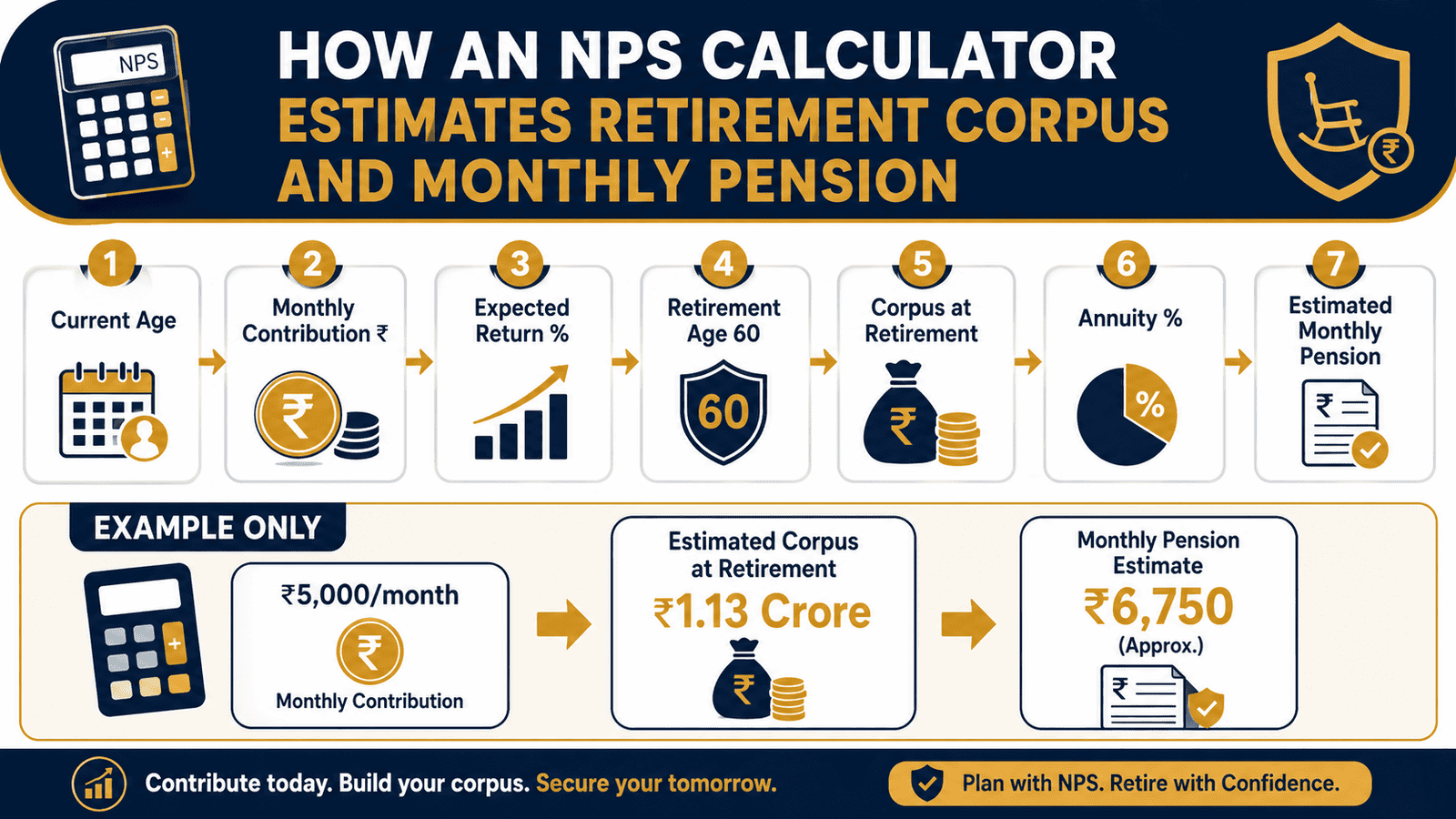
How to Calculate NPS Retirement Corpus and Monthly Pension
The NPS calculator uses a future value formula to project how monthly contributions may grow over a contribution period. Here is the logic in plain terms.
Corpus = P × [((1 + r)^n − 1) ÷ r] × (1 + r)
P = monthly contribution | r = monthly rate of return (annual return ÷ 12) | n = total months of contribution (years × 12)
Once the corpus is estimated, two further calculations produce the pension output:
Annuity Amount = Corpus × annuity percentage
Monthly Pension = (Annuity Amount × annuity rate) ÷ 12
Lump Sum = Corpus − Annuity Amount
Step-by-step using illustrative assumptions (not guaranteed outcomes):
- Monthly contribution: ₹5,000
- Contribution period: 25 years (age 35 to 60) | Total months: 300
- Expected annual return: 9% (assumption only) | Monthly rate: 0.75%
- Annuity percentage: 40% | Annuity rate: 6% (illustrative)
At these assumptions, the estimated corpus at age 60 is approximately ₹56.5 lakh. From that corpus: the annuity portion (40%) is ₹22.6 lakh, the lump sum (60%) is ₹33.9 lakh, and the estimated monthly pension at a 6% annuity rate is approximately ₹11,300 per month.
These numbers shift materially with age and contribution amount. Understanding how compounding works explains why starting five years earlier can add over ₹35 lakh to the same contribution plan.
| Scenario | Key Inputs (9% return, 6% annuity rate, 25 years) | Est. Monthly Pension |
|---|---|---|
| Conservative | ₹3,000/month → corpus ≈ ₹33.9 lakh | ≈ ₹6,780/month |
| Moderate | ₹5,000/month → corpus ≈ ₹56.5 lakh | ≈ ₹11,300/month |
| Higher contribution | ₹10,000/month → corpus ≈ ₹1.13 crore | ≈ ₹22,600/month |
All figures above are illustrative estimates. Actual returns are market-linked and not guaranteed. Annuity rates vary by provider, age at retirement, and plan type. Verify current withdrawal rules and annuity requirements from PFRDA at pfrda.org.in before making any retirement planning decision.
Key Takeaways
- NPS calculator output is an estimate, not a promise. Returns are market-linked and depend entirely on actual fund performance — not the assumption you enter.
- A ₹5,000/month contribution from age 35 at 9% assumed return may produce a corpus of ₹56.5 lakh. Drop the return assumption to 7% and the same contribution produces roughly ₹39 lakh — a ₹17.5 lakh difference from one input change.
- Monthly pension depends on annuity rate, which varies by life insurance provider and age at retirement. The corpus number is not the pension number — these are two separate outputs.
- At retirement, a minimum portion of the NPS corpus must be used to purchase an annuity. The remaining balance may be withdrawn as a lump sum, subject to PFRDA rules and income tax conditions.
- Starting at 30 instead of 35 with ₹5,000/month at 9% return increases estimated corpus from ₹56.5 lakh to over ₹92 lakh — purely from five additional compounding years. See how compounding works with Indian examples.
- Use the NPS calculator to test a range of scenarios — not to set a single retirement income target. Inflation, healthcare costs, and future rule changes are not captured in the basic estimate.
Key Facts at a Glance
| Item | Detail |
|---|---|
| Tool name | NPS Calculator |
| Primary use | Estimate NPS retirement corpus and monthly pension |
| Key inputs | Current age, monthly contribution, expected return, retirement age, annuity percentage, annuity rate |
| Key outputs | Total contributions paid, estimated corpus, lump sum, annuity amount, monthly pension estimate |
| Regulated by | PFRDA — pfrda.org.in |
| Calculator reference | NPS Trust — npstrust.org.in |
| Returns guaranteed? | No — NPS is market-linked |
| Verify current rules at | PFRDA, NPS Trust, Income Tax Department |
How the NPS Calculator Works: The Four Phases
The calculator models your retirement journey across four phases. Understanding each one helps you read the output accurately — and avoid over-relying on a single number.
Phase 1: Accumulation
Every month you contribute to your NPS Tier 1 account, those contributions are invested in a mix of equity, corporate bonds, and government securities through a pension fund manager you choose. The calculator assumes a consistent annual rate of return across your entire contribution period — this is a planning input, not a fund performance guarantee.
The accumulation phase rewards longevity. A subscriber who starts at 30 and retires at 60 has 360 months of compounding. One who starts at 40 has only 240 months. At the same ₹5,000/month contribution and 9% assumed return, the 30-year subscriber ends up with an estimated corpus nearly 2.7 times larger — because compounding accelerates dramatically in the final years. According to NPS Trust, pension wealth in the account is the sum of contributions plus investment gains — and it fluctuates with market performance.
Phase 2: Corpus at Retirement
At retirement — typically at age 60 for private sector subscribers under current PFRDA norms — the total accumulated value in your account is the retirement corpus. This is the headline output of the NPS calculator. It is entirely dependent on the assumed return you entered. If the fund averages 7% instead of the 9% you assumed, the corpus will be materially lower. This is why running a conservative scenario alongside your base case is essential, not optional.
Phase 3: Annuity Purchase and Lump Sum
At retirement, the corpus cannot be fully withdrawn as cash in most cases. A defined minimum portion must be used to purchase an annuity from a PFRDA-empanelled life insurance company. The annuity converts a capital sum into a lifetime monthly income — that is your pension. The calculator requires two annuity inputs: the annuity percentage (share of corpus going to the annuity purchase) and the annuity rate (the annual yield the annuity generates). These are separate variables. The annuity percentage is governed by PFRDA rules. The annuity rate is determined by the insurance company you choose at retirement — it varies by provider, your age at retirement, and the annuity plan type selected.
The remaining corpus portion may be withdrawn as a lump sum, subject to income tax rules. According to the Income Tax Department at incometax.gov.in, the tax treatment of NPS withdrawals is specific and may change — always verify before planning a withdrawal.
Phase 4: Monthly Pension
The annuity amount generates your monthly pension. If your annuity amount is ₹22.6 lakh at a 6% annuity rate, your annual pension income is approximately ₹1,35,600 — or roughly ₹11,300 per month for life, paid by the annuity provider. Note that annuity income is taxable as per your income tax slab in the year of receipt. Only the lump sum withdrawal qualifies for tax-exempt treatment under applicable conditions — verify current rules at incometax.gov.in.
Why the Same Contribution Produces Different Results
Two subscribers each contributing ₹5,000/month can see dramatically different calculator outputs based on: when they started, the return their fund actually earns versus the assumption used, the annuity provider and rate available at their retirement date, and any rule changes by PFRDA or the government over the contribution period. The calculator shows a scenario — not a destination. For a full foundation on how the National Pension System works before interpreting these numbers, read our NPS basics explained guide.
Real Example: Rahul’s NPS Estimate
Rahul is 35, a senior software engineer in Pune earning ₹18 lakh per year. He has opened his NPS Tier 1 account and wants to understand what ₹5,000 per month might become by age 60. He runs the calculator with a moderate set of assumptions.
Inputs used (illustrative — not guaranteed):
- Monthly contribution: ₹5,000 | Current age: 35 | Retirement age: 60 | Period: 25 years
- Expected annual return: 9% | Annuity percentage: 40% | Annuity rate: 6%
Estimated outputs:
- Estimated corpus at 60: ₹56.5 lakh
- Lump sum (60%): ₹33.9 lakh (subject to tax rules and PFRDA conditions)
- Annuity purchase (40%): ₹22.6 lakh
- Estimated monthly pension: ₹11,300
Rahul’s immediate realisation: ₹11,300 per month from NPS alone will not be adequate retirement income at today’s costs — let alone after 25 years of inflation. This makes NPS one component of a retirement plan, not the whole plan. To understand how much total corpus Rahul actually needs to retire with confidence, see our retirement corpus planning guide.
Comparison: NPS Calculator vs PPF Calculator vs EPF Calculator
| Parameter | NPS Calculator | PPF / EPF Calculator |
|---|---|---|
| Return type | Market-linked assumption | Fixed / government-declared rate |
| Monthly pension output | Yes — annuity and pension estimate | No — lump sum only |
| Annuity lock-in shown | Yes — mandatory portion modelled | Not applicable |
| Tax benefit modelled | 80CCD(1), 80CCD(1B), 80CCD(2) | 80C (PPF / EPF) |
| Returns guaranteed? | No | Yes (rate declared periodically) |
| Best for | Estimating pension income from a retirement corpus | Estimating lump sum accumulation at maturity |
For a full comparison of how NPS, PPF, and EPF actually build your retirement corpus — not just their calculators — see our PPF EPF comparison breakdown.
How to Decide What’s Right for You
You are between 25 and 40 with at least 20 years to retirement — run the NPS calculator at three return levels: 7%, 9%, and 11%. The range of corpus outputs tells you more than any single scenario. Small contributions started early can compound into meaningful corpus; the tool is most useful to people in this window.
You are within 10 years of retirement — shift your focus from the corpus figure to the monthly pension output. At this stage, the annuity rate available at retirement matters as much as total accumulated corpus. Research PFRDA-empanelled annuity providers and their current rates before locking in assumptions.
Your employer offers NPS as part of your CTC — always add the employer’s monthly contribution to your calculator input alongside your own. Employer contributions under Section 80CCD(2) add to your retirement corpus without counting against your personal ₹1.5 lakh 80C limit. Ignoring this understates the projected outcome significantly.
You want to use the NPS calculator to estimate the value of the extra ₹50,000 80CCD(1B) deduction — run a separate tax calculation. The NPS calculator shows corpus and pension, not tax savings. The deduction benefit is real but depends on your tax slab and whether you are in the old regime.
You need to understand Tier 1 withdrawal rules before committing to NPS — the calculator models corpus and pension but not early withdrawal conditions, partial withdrawal limits, or exit scenarios. Read our guide on Tier 1 rules before treating the calculator output as a final plan.
You understand how annuity products work or are not comfortable having a portion of your retirement corpus converted into a product you cannot exit — do not use NPS as your sole retirement vehicle. The monthly pension estimate in the calculator assumes an annuity purchase at conditions that may not suit your situation at the time of retirement.
Common Mistakes to Avoid
Treating the Corpus Estimate as a Guarantee
The most common mistake with the NPS calculator is reading the output as a commitment. NPS is a market-linked scheme — the corpus number is what your contributions would grow to if returns averaged exactly what you entered across 25 or 30 years. Markets do not work that way.
Always run a downside scenario. Reduce your return assumption by 2 percentage points and check whether that corpus still meets your retirement income need.
Focusing Only on the Corpus and Ignoring Monthly Pension
A ₹56 lakh corpus sounds substantial until you work out that it produces only ₹11,300/month in pension at a 6% annuity rate on a 40% annuity share. The corpus is not the income — the annuity output is the income. Always read both numbers together.
Ignoring the Annuity Rate Input
A 1% difference in annuity rate on ₹22.6 lakh changes monthly pension by approximately ₹1,883 per month — or over ₹22,600 per year, every year for life. The annuity rate you enter in the calculator should reflect what PFRDA-empanelled insurers actually offer, not a round number you guessed at.
Forgetting That ₹11,300 Today Will Buy Far Less in 25 Years
At 6% annual inflation, ₹11,300 in 25 years has the purchasing power of approximately ₹2,950 in today’s money. A pension estimate that looks reasonable today may cover a small fraction of actual retirement expenses when you get there. Always run an inflation-adjusted income need calculation alongside the NPS estimate.
Entering Only Your Own Contribution and Omitting Employer NPS
If your employer contributes to NPS as part of your CTC, the calculator must reflect the combined contribution — not just your personal share. Entering only your own ₹5,000 when your employer also contributes ₹3,000 understates the projected corpus by nearly 38%.
Using an Unrealistic Return Assumption
Entering 14% or 15% as expected return makes the corpus appear very large and creates false confidence in the plan. Conservative NPS planning uses 7–8% for balanced or debt-heavy allocations and no more than 9–10% for equity-heavy portfolios. Using a rate significantly above this is not a planning scenario — it is wishful thinking in a spreadsheet.
When This May Not Be the Right Choice
NPS may not suit your situation if you need liquidity before age 60. The Tier 1 account locks in contributions with only limited partial withdrawal provisions. If you foresee major financial needs — for a home, a business, or a family commitment — before retirement, NPS is not the right primary savings vehicle for those funds.
If you are not comfortable with market-linked return variation, NPS may produce anxiety at market lows. Unlike PPF or EPF which carry declared returns, your NPS corpus can fall in value during poor market periods, particularly if your equity allocation is high.
If you do not understand how annuity products work — including the taxation of annuity income, the loss of capital flexibility once the annuity is purchased, and how annuity rates are set — committing a large share of your retirement corpus to an annuity deserves professional advice before action.
If any of these apply to your situation, it may be worth exploring alternatives before committing.
Official Rules and Where to Verify
NPS regulations, contribution rules, withdrawal conditions, annuity requirements, and tax treatment are governed by PFRDA and updated through official circulars and Budget announcements. Always verify current rules before making any contribution, withdrawal, or retirement planning decision.
- PFRDA — pfrda.org.in (scheme regulations, withdrawal rules, subscriber guidelines, empanelled annuity providers)
- NPS Trust — npstrust.org.in (official calculator, fund performance, scheme-specific details)
- Income Tax Department — incometax.gov.in (tax deduction limits under 80CCD(1), 80CCD(1B), and 80CCD(2); tax treatment of lump sum withdrawal and annuity income)
Rules, limits, and rates on this topic can change with each Budget or regulatory update. Always verify current figures directly from the official source before making any financial decision.
Expert Tips
- Run three scenarios every time you use the NPS calculator: conservative (7% return, 5% annuity rate), moderate (9%/6%), and optimistic (11%/7%). The spread of outcomes is the most honest picture of what NPS might deliver — a single number gives you false precision.
- Compare the monthly pension estimate against your current monthly expenses, inflated forward at 6% per year to your retirement date. If the NPS pension covers less than 25–30% of that figure, build a separate retirement corpus alongside NPS through EPF, PPF, or equity mutual funds.
- If your employer offers NPS as part of your salary package, always factor in that employer contribution when using the calculator. For salaried employees, this can add materially to the corpus at no additional personal cost. Read our full guide on employer NPS benefit to understand how the tax treatment works.
- Revisit your NPS calculator inputs every year when your salary changes. A ₹1,000 increase in monthly contribution at age 35 adds roughly ₹11,300 to your estimated corpus over 25 years at 9% — and a larger increase compounds proportionally. Small top-ups early have outsized effects.
- Never compare NPS and PPF corpus figures directly without accounting for the annuity split. NPS locks a portion of the corpus into a pension product at retirement — PPF gives you the full maturity amount in cash. You are comparing different liquidity profiles, not just different return rates.
- For the 80CCD(1B) ₹50,000 deduction to reduce your actual tax bill, confirm that you are in a taxable slab under the old regime and have not already exhausted deductions more efficiently elsewhere. The deduction is real — but its net benefit depends on your effective tax rate and existing deduction usage.
Frequently Asked Questions
Is the NPS calculator result guaranteed?
No. The NPS calculator produces a projection based on the return assumption you enter. NPS is a market-linked scheme — actual fund returns fluctuate with equity, debt, and government securities markets over your investment period. The corpus and monthly pension outputs are planning estimates, not commitments by PFRDA, NPS Trust, or any fund manager.
How much monthly pension will I get from NPS?
It depends on three variables: the size of your retirement corpus, the percentage allocated to annuity, and the annuity rate offered by the life insurance company you choose. The same ₹22 lakh annuity amount produces very different monthly pensions at a 5% rate versus a 7% rate. Check annuity rates from PFRDA-empanelled insurers to frame a realistic pension estimate before you retire.
What is an annuity in NPS?
An annuity is a product where you give a life insurance company a lump sum of capital and they pay you a fixed monthly income for life — or for a defined period, depending on the plan you select. In NPS, PFRDA requires that a minimum portion of your retirement corpus be used to purchase an annuity from an empanelled insurer. That annuity income becomes your monthly pension.
Can I withdraw my full NPS corpus at retirement?
Not in most cases. At retirement, a minimum portion of your corpus must be used to purchase an annuity. Only the remaining portion is available as a lump sum withdrawal. There is a specific corpus threshold below which PFRDA permits full withdrawal without the annuity requirement. Verify the current threshold and annuity rules directly at pfrda.org.in — these conditions can change.
Is NPS better than PPF or EPF for retirement?
There is no universal answer. NPS is market-linked and may offer higher long-term returns, plus a pension income stream and an additional ₹50,000 deduction under 80CCD(1B). PPF and EPF offer government-backed or declared returns with full corpus access at maturity and no mandatory annuity. Many salaried employees use all three: EPF through payroll, PPF for guaranteed accumulation, and NPS for the additional tax benefit and pension component.
Which return assumption should I use in the NPS calculator?
For conservative planning, use 7%. For moderate planning, use 9%. Cross-check against an 11% optimistic case to understand the upper bound. Avoid entering anything above 12% as a base assumption — it makes the corpus appear comfortable when the actual outcome may be materially lower.
Can I change my monthly NPS contribution amount?
Yes. NPS allows you to vary your contribution amount from year to year, provided you meet the minimum annual contribution requirement for your Tier 1 account to remain active. Verify the current minimum at pfrda.org.in before making changes.
Is the lump sum from NPS taxable?
Under current rules, a defined portion of the lump sum withdrawn from NPS at retirement qualifies for tax exemption. Annuity income received as monthly pension is taxable as per your income slab in the year of receipt. The exact percentages and conditions are governed by the Income Tax Act and may change with Budget amendments — verify current treatment at incometax.gov.in before planning a withdrawal.
What happens to my NPS account if I change jobs?
Your NPS Tier 1 account is portable across employers and sectors. Changing jobs does not close or affect the account. You can continue contributing independently or through your new employer if they offer NPS in your CTC. Check PFRDA guidelines for specific rules on contribution continuity and account activation status.
Final Verdict
The NPS calculator is one of the more useful retirement planning tools available to salaried employees — but only when used with realistic assumptions and honest interpretation. For someone like Rahul in Pune starting at 35 with ₹5,000 per month, it reveals a reasonable pension estimate: meaningful, but not sufficient as a standalone retirement plan. That is the honest output the calculator delivers, and it is the right starting point for a broader retirement strategy.
Use the NPS calculator to run multiple scenarios, stress-test your assumptions, and build a range of outcomes. Then pair those outputs with a full retirement corpus estimate — our retirement corpus planning guide connects NPS numbers to actual income needs. Always verify the latest rules from official sources or consult a qualified professional before making any financial decision.
This article is for educational purposes only and should not be treated as personalised financial, tax, investment, insurance, or legal advice. Tax rules, interest rates, regulatory limits, and product features can change with each Budget or policy update. Please verify current rules from official government sources or consult a qualified and registered professional before making any financial decision.

Suresh Nair writes about Indian government savings schemes, post office schemes, and conservative long-term savings options. His content is especially useful for families, parents, senior citizens, and low-risk savers who want to understand scheme rules before depositing money.
He covers topics such as Public Provident Fund, Sukanya Samriddhi Yojana, Senior Citizens’ Savings Scheme, National Savings Certificate, Kisan Vikas Patra, Post Office Monthly Income Scheme, National Pension System, post office fixed deposits, post office recurring deposits, child savings schemes, senior citizen savings options, maturity rules, withdrawal rules, lock-in periods, and tax treatment.
Suresh’s writing is mature, rule-focused, and cautious. He explains eligibility, deposit limits, tenure, interest calculation, tax benefits, withdrawal conditions, and practical use cases in simple language. His articles are useful for readers who prefer safety and predictable rules over high-risk investments. Since government scheme interest rates, deposit limits, lock-in rules, and tax treatment may change through official notifications, readers should verify current details from India Post, PFRDA, Income Tax Department, or relevant government sources before investing.